I’ve been asked a few times about how to split up countries into regions and charge shipping differently to the different areas in WP E-Commerce. This was something that was almost, but not quite possible with one of my existing plugins.
Now it’s just a little bit easier.
What You’ll Need
- WP E-Commerce (3.7.6 or later)
- My Weight / Destination plugin
- Database access to your WP e-Commerce database
In this example we’re going to show how to achieve the following:
- Set of Weight rates for New Zealand (North Island)
- Set of Weight rates for New Zealand (South Island)
- Set of Weight rates for the rest of Asia/Pacific
- Set of Weight rates for Europe
The Plan
To acheive our end goal we’re going to:
- Create 2 regions attached to the country “New Zealand”
- Remove New Zealand from the Asia and Pacific continent (So people ordering to NZ see those prices, not the general “Asia and Pacific” pricing
- Set up per-country/region rates for New Zealand
- Set up per-continent rates for Asia and Pacific, and Europe
Getting Started
The first job is to find out the “country ID” for New Zealand. Using your favourite database you’ll want to look in the wp_wpsc_currency_list table for the entry for New Zealand, and make a note of the value of the “id” field – in our case 156.

While we’re here, we’ll also move New Zealand out of it’s current continent. This basically just involves updating the same record, and setting the continent field to something unique, e.g.
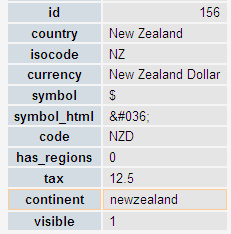
Next – you’ll need to create whatever regions you want in the wp_wpsc_region_tax table, using the ID you’ve just found as the “country_id” field, e.g.
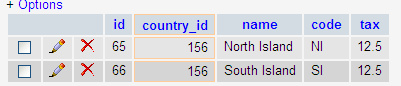
Configuring your pricing
That’s all with the scary database stuff, now on to the easy stuff. First of all you’ll need to activate both of the shipping modules:
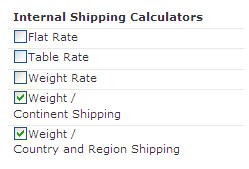
First up we’ll configure the continent-based pricing. Click on “Edit” next to the weight-continent pricing. Up will pop the configuration pane, with a drop-down of the standard continents – and also our “newzealand” continent – which we’re not going to use since New Zealand is going to be priced by region.
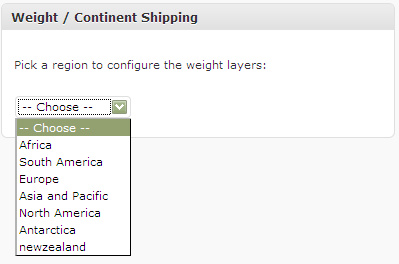
Let’s pick Europe, and configure some weight rates.
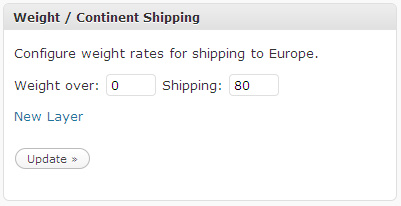
In this case we’ve just configured one weight band – which means that anything shipped to Europe will be charged at the same rate – £80 in this case.
We can do the same for Asia and Pacific, except maybe setting up multiple layers using the “Add Layer” link.
At this stage shipping will work for Europe, Asia and Pacific, but not for New Zealand (Since we took it out of Asia and Pacific).
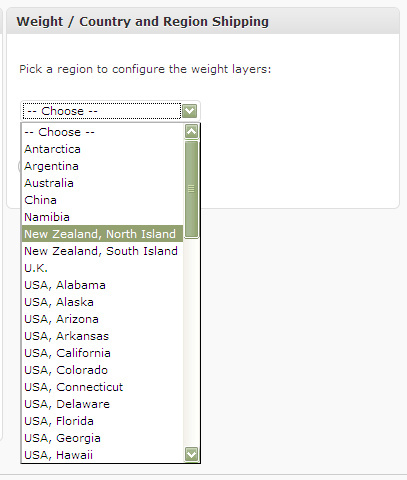
Click on “Edit” next to the Weight / Country and Region pricing. Up will pop the configuration pane, with a drop-down of the countries, including regions where configured – for example, we can see our North Island, and South Island regions here:
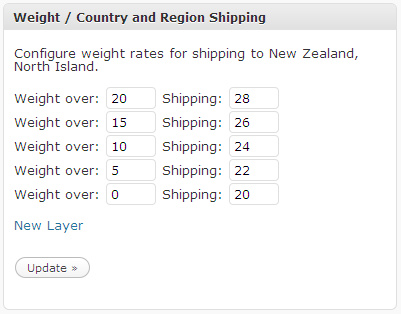
Selecting a region gives us the chance to configure weight rates, e.g.
Repeat for other regions, and you’re set. Happy Shipping!
Note: All weights should be set up in lbs, no matter what weight unit you used to set the weight for your products. WP e-Commerce will convert between them for you.
April 15, 2010 at 4:23 pm
Hi Lee
Thanks for this plugin, it’s EXACTLY what I was looking for. Odd that WP E-Comm plugin didn’t have this built in, I assume it’s a pretty common style of shipping.
Anyway, unfortunately I have an issue that I can’t resolve. After installing, I get the “Please provide a Zipcode and click Calculate in order to continue” error. The page FLATLY refuses to move forward from that point.
Any suggestions?
Regards,
Jeff
April 15, 2010 at 4:30 pm
That error normally happens because the shipping modules don’t return a quote for the country /region you’re trying to ship to. In the case of my plugin, this would happen if you tried to ship to a continent that you hadn’t set a rate for and or a country & region that you hadn’t set a rate for.
April 16, 2010 at 1:15 am
Hi Lee
Yeah, I thought that might be the case, but I entered rates for a couple of countries (to test it out), and it still came up with that error (when I selected those countries). Do I have to enter rates for ALL countries (that I’m selling to as defined under the general settings), even if I’m not requesting a quote for it?
Perhaps I’m entering the shipping rate info incorrectly? For example, for Australia I have entered:
Weight Over: 2000 Shipping: 34
Weight Over: 1250 Shipping: 26
Weight Over: 900 Shipping: 21
Weight Over: 750 Shipping: 18
Weight Over: 600 Shipping: 14.50
Weight Over: 450 Shipping: 11.50
Weight Over: 300 Shipping: 8
Weight Over: 150 Shipping: 5
With the assumption that the weight is grams (how can I set this to default?) and the cost is in USD.
Anything that you can spot that might be where I’m going wrong?
Regards,
Jeff
April 16, 2010 at 7:27 am
Yes, I can 🙂
The weights that you configure in the plugin are in pounds (lbs). WP e-Commerce converts all weights into pounds as part of the shipping calculations. So my guess is that your weight in grams is being converted to a small number of pounds (Less than 150) – so there’s no rate it can use.
If you set a weight for 0 and over, and convert your weight bands into lbs it should all spring into life.
Hope that helps.
April 16, 2010 at 8:44 am
BINGO. Thanks for that Lee.
Basically the figure “150” (my lowest weight setting as per the previous comment) was being read by WP E-Comm as “150 POUNDS”. Lol. No wonder it was having a hernia.
So therefore my figures SHOULD have been:
Weight Over: 4.40 Shipping: 34
Weight Over: 2.75 Shipping: 26
Weight Over: 1.98 Shipping: 21
Weight Over: 1.65 Shipping: 18
Weight Over: 1.32 Shipping: 14.50
Weight Over: 0.99 Shipping: 11.50
Weight Over: 0.66 Shipping: 8
Weight Over: 0.33 Shipping: 5
And I had to add 1 more property, with weight over 0 pounds costing some minimal fee (in my case I just repeated the 0.33 dollar figure).
Is there no way to change the default weight setting in WP E-Com?
In any case, thank you VERY much for your help Lee, you’ve nailed it.
Cheers
Jeff
April 16, 2010 at 8:55 am
You’ve got it 🙂
I suppose I should really let you specify the units in the weight rates, and seamlessly convert between them. If anyone wants to sponsor that work, or provide a patch I’d happily put it in – but otherwise it’ll just go on my rather long to-do list …
Glad you’re enjoying the plugin.
April 19, 2010 at 10:30 pm
Hi, if you want convert the weight into grams or other..
frist check the convert table of weight on google..
at the line 365 above of
wp-e-commerce-weight-continent-shipping.php file
after : foreach ($layers as $key => $shipping) {
put ==> $weight=$weight*450;
before: if ($weight >= (float)$key) { [….]
in this case convert it into grams. If you want other weight check on table the conversion..
i’m developing a new option on admin where can set the conversion table. Stay tuned here.
very thanks to LEE for this plugin..
April 19, 2010 at 10:51 pm
mistake..
don’t put $weight=$weight*450;
but under at the IF
if ($weight*450 >= (float)$key) { [….]
this is correct
April 20, 2010 at 7:15 am
WP e-Commerce already has a function that’ll convert all of the weight units it allows you to put products in with (Can’t remember the exact name at the moment!) – so you should use that to convert. If I was coding this up – I would store all values in a single unit (lbs), and use them to compare, but along with each rate store the unit the user put it in at so we can show their original units in the admin interface.
April 21, 2010 at 2:05 am
Hi there,
I am a bit confused by your second step:
Next – you’ll need to create whatever regions you want in the wp_wpsc_region_tax table, using the ID you’ve just found as the “country_id” field, e.g.
I am using phpMyAdmin to edit the database – when I look at wp_wpsc_region_tax table I can see fields for:
id
country id
name
code
tax
but I am not sure if I am meant to add a new field or edit one of the existing fields
Thanks
Chris
April 21, 2010 at 7:30 am
OK – so you need to find out the “id” from wp_wpsc_currency_list for the country you’re trying to split into regions. If it’s a standard install it should be the same as the example I show, e.g. 156
Then if there are already regions in the wp_wpsc_region_tax table you’d amend them, but for New Zealand, I’m pretty sure there won’t be – so you’d need to add a new row for each region, using 156 as the “country_id”.
In your case it’ll probably end up looking pretty much like this:
Although you’ll have three rows, not two if you’re also creating a region for Auckland.
Hope that helps.
April 21, 2010 at 2:11 am
Also – I installed your plugin (running WP v2.8.4 and WP-ecomm v3.7.6) and when I go to edit > settings > shipping I cannot see any of the shipping options anymore. Is this normal or do I have to make the above configurations to see the shipping options.
Why I need your plugin:
I need to create
New Zealand: Auckland Weight Shipping Rates
New Zealand: North Island Weight Shipping
New Zealand: Sounth Island Weight Shipping
Thanks
Christine
April 21, 2010 at 7:26 am
No, that’s definitely not normal. My first thought would be a WP 2.8 incompatibility as I haven’t tested with that. Do you have any errors in your PHP error log – or javascript errors in the browser?
April 21, 2010 at 8:12 am
No errors in the browser – just heading with Shipping and blank screen below that. Will try upgrading to 2.9 and see if that fixes and will then get back to you
Thanks for your time
Christine
April 21, 2010 at 8:51 am
That definitely sounds like a PHP error which would indicate either:
– a corrupt copy of the plugin
– a bug in the code
– or I’m calling a function which doesn’t exist on your system (ie a wp 2.9 only function, or maybe a PHP function you don’t have – are you on PHP 5?)
Let me know how it looks after you’ve upgraded – although if you can find your PHP error log that would almost certainly tell you what the error was.
April 22, 2010 at 9:42 am
Hi Lee
Upgrade to WP 2.9 and shipping plugin is now viewable.
April 22, 2010 at 10:36 am
Excellent – glad to hear it …
April 30, 2010 at 1:34 pm
Can I change the weight in other than “pounds”?
April 30, 2010 at 3:33 pm
Not right now – you have to put all the weights into the shipping plugin in pounds. I could extend it to support other weights but I don’t particularly have time right now I’m afraid.
May 4, 2010 at 3:27 pm
hi, just downloaded your plugin and trying to figure out the database thing, but is it possible to this an easier way.
I need: shipping & Weight for following region, and it should be sufficient for the customer to choose themselves between:
norway (default)
europe
rest of the world
We’re only selling t-shirts, and each is about 160 grams.
do i have to do it the hard way ?:-)
regards Chris
May 4, 2010 at 3:54 pm
Since you’re not splitting an existing country into “regions” – you shouldn’t *need* to make any database changes.
Just enable both of the shipping modules that the plugin provides, and use the “Weight / Country and Region” module to set the weight rates for Norway, and the “Weight / Continent” module to set rates for the other continents.
Two notes:
1. There is no “continent” called “Rest of the World” – so you’ll have to set the rates for each continent separately
2. Users purchasing to Norway will get two rate options, one from the “Country” module, based on the rates you configure for Norway, and one from the “Continent” module, based on the rates you configure for “Europe” – but you said you’d be OK with that 😉
May 4, 2010 at 6:13 pm
Thanks, i’ve put in grams in the weight field, should i change anything in the php file? or is it enough to use grams the wp e-commerce settings?
May 4, 2010 at 6:28 pm
WPEC converts all product weights into pounds – so the figures you put in the weight/region plugin have to be in pounds also – irrespective of what you choose when you create your products
May 25, 2010 at 1:06 am
Hello Lee, Thanks for the great helpful plugins :).
I would like to ask is it possible to use multiple courier service for single destination shipping?
e.g
shipping 2 kg from “City A” to “City B” have 2 courier service available to choose:
– courier X: price=$5, arrived about=4 Day
– courier Y: price=$10, arrived about=2 Day
I already have that courier price and arrival data and I want to combine it with your plugin.
Any help greatly appreciated
Regards
May 25, 2010 at 9:21 pm
Not quite sure what you mean – but I think what you’d need to do is code up a custom shipping module. There’s a tutorial, and starting-point plugin here:
http://getshopped.org/resources/docs/get-involved/writing-a-new-shipping-module/
July 21, 2010 at 10:53 pm
I think what they want is to have the module duplicated so that the customer can choose the shipping type they want.
At least, this is what I want for my site. 🙂
Is there anyway to run two versions of the weight/continent module? I’ve tried editing it myself, but I end up with a blank site instead of a working one! At one point I got it working, but then I got an array error in the admin backend.
I actually have it set to be a “flat rate” module by setting each item’s weight to 1 – this way the price changes based on how many items they’ve ordered.
I just need to duplicate it so I can have a “first class” shipping and a “priority mail” shipping choices for the customer. Can you help?
July 21, 2010 at 11:17 pm
Within wp-content/plugins/wp-e-commerce-weightregion-shipping, you’d have to:
Duplicate wp-e-commerce-weight-continent-shipping.php
Within your new copy:
Rename the class to make it unique
Change the “Internal name” set in the constructor
Amend wp-e-commerce-weight-region-shipping.php to include your new file, and hook it in [Basically copy one of the existing blocks, rename the file and class names]
July 22, 2010 at 1:45 am
Thanks for your help! Maybe I’m doing something wrong.
Here’s what I added to wp-e-commerce-weight-region-shipping.php (which kills my site and makes everything blank):
/* FOR PRIORITY MAIL */
require_once(“wp-e-commerce-weight-continent-shipping-priority.php”);
function ses_weightregion_shipping_priority_add($wpsc_shipping_modules) {
global $ses_weightregion_shipping_priority;
$ses_weightregion_shipping_priority = new ses_weightregion_shipping_priority();
$wpsc_shipping_modules[$ses_weightregion_shipping_priority->getInternalName()] = $ses_weightregion_shipping_priority;
return $wpsc_shipping_modules;
}
I copied the original weight continent file and made it -priority.php, and changed the class name and internal name to match above.
July 22, 2010 at 7:45 am
All seems sensible. If you can find your PHP error log it should tell you what the error is – alternatively if you send me over a ZIP of the whole wp-e-commerce-weightregion-shipping folder I’ll have a look when I get chance …
September 13, 2010 at 5:36 pm
Hi Lee:
I got the duplication to work but unfortunately it modifies the same data base fields so I can’t actually have two different configurations for Express & Regular. Any suggestions?
Cheers.
September 13, 2010 at 6:08 pm
Ups… it seems that although I have the two shipping methods available in the admin panel only one shows in the checkout page. Strange as they have different internal names, class names and have been added with different names.
I wonder why? 🙂
September 13, 2010 at 7:17 pm
A little update in my investigations:
When I try to configure the data for my “custom express method” (which is a copy of the weigt-country-region) the forms are filled with data from ses_weightcountryregion_shipping_options within the _options table.
If I try to change them nothing happens in the _options table ( not in ses_weightcountryregion_shipping_options nor in ses_weightcountryregion_shipping_options_express )
Is my will to get two different rates for the same country/region depending in the method I choose too complicated? (Both methods being actually the same but with just changed names)
Cheers.
September 13, 2010 at 7:42 pm
Hi,
I took a look at the code you provided, and everything you’ve done looks OK. I think the problem is that the AJAX actions and DIV names aren’t unique (It doesn’t automatically pick up the revised internal name for these bits). So – when you pick the country and the form refreshes, it basically picks up the standard method, not your revised one – because your Ajax call is going to:
admin-ajax.php?action=ses-weightcountryregion-layers[…]
instead of the new one you’ve registered:
admin-ajax.php?action=ses-weightcountryregion-express-layers[…]
If you fix that link everything should work as you’re expecting.
September 14, 2010 at 12:48 pm
Hello again Lee:
After a few changes in *-express.php now I am almost there.
It is actually working, but now there is a bug now with the “Shipping address same as billing address?” check button. When I click this checkbox the selected shipping method changes to the first one… I presume it is related with ajax again.
Maybe the name of the divs or something like that are the same and the ajax gets confused.
September 14, 2010 at 7:19 pm
I can’t see anything wrong that would cause this – the INPUT fields have unique names, and indeed I can’t reproduce this behaviour on my test box. What happens if you enable one of the out-of-the-box plugins as well?
September 15, 2010 at 12:24 pm
It happens the same if I select other shipping methods as for example Flat Rate and Table Rate.
Did you checked and unchecked the “Shipping address same as billing address” box three or four times running? That’s what is causing this behavior.
Cheers.
September 15, 2010 at 7:46 pm
Yes – I still can’t reproduce it on my test site.
September 16, 2010 at 6:15 pm
Hi
I know it is somehow related to the ajax.functions.php file as I modified the shopping-cart.php file so the output changes a little bit between them.
shopping-cart.php –> 24h shipping
ajax.functions.php –> 24h shipping- Choose a Shipping Rate
I am really stuck in this one, could you please share your thoughts?
September 16, 2010 at 6:38 pm
I can’t really help with this – it seems to be related to changes you’ve made as I can’t reproduce it with a standard build with your shipping code.
September 16, 2010 at 7:44 pm
I decided to set up a brand new test box, WP3.0.1, WPecommerce 3.7.6.9 and your modified from 3.0 plugin version.
Unfortunately I am still getting the same error… there is a public site where you can check it out (just grab a product go to the checkout page, select the second shipping method “Standar 24-72h” and click in the “Same billing addres” a couple of times and you will see the radio buttom from the shipping method selected jump to the other method…24h shipping)
[Removed]
I also created one in my local-host but no luck neither. I have even checked with different browsers because of my frustration.
That’s becoming my own X-file.. hahaha
You already deserve a beer so don’t hesitate you will get it anyway 😉
September 16, 2010 at 8:03 pm
I *think* this is standard behaviour (Although no idea why it doesn’t do it on my test site!). wp-e-commerce.js calls submit_change_country() when shipping same as billing is checked. This causes shipping to be re-quoted, and therefore reset to the first option. So – it’s a wp e-commerce “feature” rather than anything you’ve done – or the plugin has done.
September 17, 2010 at 12:34 am
OK I see. Then the solution would be to store this parameter and send it to the new page as the rest of the data from the form? I am still not very confident with all this ajax thing.
September 17, 2010 at 7:33 am
Or – only call the change if the country *has* actually changed.
The problem with sending the current selection is that if the user has changed the country then the pricing for the new country can look very different – and the option they had chosen isn’t necessarily right for them now – indeed it may well not even exist!
September 20, 2010 at 10:06 am
I don’t know how to do that (I am trying to do it), meanwhile I have opened a thread in the forum regarding this issue.
http://getshopped.org/forums/topic.php?id=14138
May 26, 2010 at 6:40 am
Hi,
I want to customize my wpec theme, let’s say the shopping cart page. I want to display the shipping cost calculated by the plugin instead of the usual:
<span class="pricedisplay" id='shipping_'>
Can I replace wpsc_cart_item_shipping() with the plugin’s function to do that?
I found get_item_shipping() but it doen’t work on my template.
I get a Fatal error: Call to undefined function get_item_shipping()
How do I call that from my template?
I’m just getting $0.00 as shipping value on a per product basis.
The shipping calculator works perfectly!
Awesome Plugin!
TiA.
July 26, 2010 at 2:03 pm
Hi would it be possible to set this so that it will be based on the total product price instead of weight for example:
$0.01 to $20 = $10 shipping
$20.01 to $40 = $25 shipping
and so on? Any help would be greatly appreciated. Thanks!!!
July 26, 2010 at 2:04 pm
Does this help?
http://wordpress.org/extend/plugins/wp-e-commerce-country-cart-amount-shipping-module/
July 26, 2010 at 2:32 pm
thanks for the quick reply. this seems to be what I am looking for except that I have to set the shipping on a per state/region basis. is this doable with this plugin? thanks!
July 26, 2010 at 3:13 pm
That one only supports countries I’m afraid as-is.
July 26, 2010 at 3:37 pm
how about the region-based shipping plugin above, can that be hacked to use price instead of weight?
July 26, 2010 at 3:46 pm
Yes, you could modify it to do the lookups based on cart value instead of weight.
Most of the code you’d want is in the respective getQuote() functions.
July 26, 2010 at 4:01 pm
will try it out and let you know how it goes. thanks for the help! 🙂
July 29, 2010 at 1:57 pm
Thanks for the excellent plugin.. Was about to give up when I see standard WP e-commerce doesn’t have what I want for my local shipping requirement.. This should go into the standard plugin with WP e-commerce..
Keep up the good work!
August 11, 2010 at 6:40 pm
Any results on adding several shipping options like Regular, Priority, or Express Shipping options for regions/continents to this plugin?
I have been having a difficult time with finding a way to add these shipping options to WP ecommerce. By default there only seems to be a flat rate, one weight based rate, or one table rate. This plugin definitely makes it easier to get Canada rates separate from Europe, but it still offers only one shipping option – in my case International First Class Mail. What about Priority or Express?
It would be nice if some of the shipping options at Mal’s ecommerce cart could be integrated into the plugin. They have the various shipping options and a weight based table that I set up to get USPS rates exactly. For example, you can set weights between 1 and 9 oz to go up $.25 an ounce and between 10 and 20 ounces to go up $.50 per ounce, and so on – I forget what they call that, maybe weight banding.
What should work on WP ecommerce, the USPS calculator, doesn’t because it is not weight based. I still don’t get how that works. You can only send Priority Mail boxes or flat rate containers?
Thanks for the plugin, Lee!
September 4, 2010 at 8:34 am
Hi Rick,
I don’t have any plans to add multiple options per country/region/continent right now unless someone wants to commission the work and/or provide a patch 🙂
August 19, 2010 at 12:45 am
Hi, I followed your directions above and changed the wp_wpsc_currency_list entry for new zealand but I can’t find a wp_wpsc_region_tax table anywhere. And newzealand is not showing up in the drop down menu of the admin area for the continent settings either.I’m using wp ver. 3.0.1 and wpec 3.7.6.7. Any ideas?
August 20, 2010 at 8:04 pm
You are changing the values in your database aren’t you – using phpmyAdmin or similar – not editing files?
August 20, 2010 at 4:15 am
Hi, it is possible that the plugin is adding wrong? The first shipping i add it’s ok, if i keep buying and adding products the shipping $$ doesn’t change. Any idea? Thanks!
August 20, 2010 at 8:05 pm
Sure – it’s possible – although there are plenty of people using it successfully so I doubt it. The most likely cause is that you’re not entering the shipping rates in pounds (lbs) – which you have to do – no matter what units you’ve used for your products.
August 20, 2010 at 7:36 pm
Thanks Lee, I was relieved to find this plugin as it seems that it could do just what I need for http://www.s-89.cp.e-business.ie/products-page/:
one set of prices by weight for Ireland
another set of prices by weight for everywhere else
I made Ireland it’s own continent as you did for newzealand above and am just using “Weight / Continent Shipping”. It doesn’t seem to be calculating the cost for more than one item.
It’s also not changing the shipping when I increase the update the quantity in the shopping cart — but then maybe it is but the calculations not working?
Before I made Ireland it’s own continent I tried just filling in the amounts for it in “Country and Region Shipping” and filling in the second set of rates for all the continents and use both settings, but that didn’t work either.
Likely to be something simple I’ve overlooked (I hope.)
Thanks, Ann
August 20, 2010 at 8:07 pm
Hi Ann, as per my comments to Gabriel above – it’s likely that you’re putting in the wrong weights in the shipping config. The weight bands you configure in my plugin must be in pounds (lbs).
August 20, 2010 at 8:43 pm
Thanks Lee for your time. I just testing width 2 products , Cartera1 200grs
Cartera2 1500grs
Rules:
0->$10
1->$20
The rules are ok, if i bought cartera 1 it’s $10, if i bought cartera2 it’s $20. But if i choose cartera1+cartera2 or more than 1 model the number it’s not ok. I will try to test it this weeekend. Thanks a lot
August 20, 2010 at 9:54 pm
Hi – sorry, but I’m completely confused about what you’re trying to achieve.
200 grams is 0.44lbs, so I’d expect 1 unit of Cartera1 to be $10, 2 units of Cartera1 to also be $10 (0.88lbs in weight), but then 3 units of Cartera1 to be $20 (1.32lbs in weight).
1500 grams is 3.3lbs – so any order containing one of more of Cartera2 (Together with anything else) would be $20.
What exactly do you think isn’t working?
August 21, 2010 at 8:05 am
Thanks Lee, I don’t think it’s the way I have the product weight added. I’m thinking of it as units to units rather than converting from grams to pounds. So for the product (I only have one for now), we put 180 pounds, and in the shipping settings for Ireland-
Weight over: 539 Shipping: 3.00
Weight over: 299 Shipping: 1.90
Weight over: 0 Shipping: 1.35
for all other continents-
Weight over: 539 Shipping: 7.50
Weight over: 299 Shipping: 4.25
Weight over: 0 Shipping: 3.00
Those weights are actually reflective of grams, but I assumed that if you enter the same in both places as pounds the calculations should work.
I’m thinking unlikely, but any chance the plugin isn’t compatible with the theme? I’ve had that with certain widgets. I’m using Genesis.
August 21, 2010 at 1:01 pm
So what exactly doesn’t work?
Can you send me some details of the site privately so I can take a look? http://www.leewillis.co.uk/contact/
August 21, 2010 at 7:51 pm
I sent a message. Thanks for your help.
August 21, 2010 at 8:05 pm
I’ve replied. The problem is that your products have variations, and although you’ve set the weight against the product, the variations have been left with a weight of zero, hence the pricing not going up. If you add weights to each of the variations, then it’ll all start working as expected.
August 21, 2010 at 10:15 pm
Brilliant! All working now! Because the weight area for variation is under ‘more’ I didn’t realise it was even there – and then I thought you only put the additional weight! Now I’ve got that you have to input the total weight for each variation (just like you need to put the total price). Thanks so much!
August 21, 2010 at 8:26 am
Another question a little off topic, but you may be able to point me in the right direction. Is there a plugin that will limit the amount a customer can purchase – just because you don’t want to add an infinite number of weight bands in your settings? 🙂
August 21, 2010 at 1:02 pm
No – there isn’t right now – but in future versions (3.8 onwards) you can set the rate to be a % of cart total, so you could make your final band be a %-age rather than a fixed amount …
August 25, 2010 at 9:40 pm
Not that I know of – although I’m sure one could be written …
August 21, 2010 at 2:35 pm
Lee, now i see that it’s not an error, I think Ann’s problem could be the same concept error that i had. Now i see that the shipping charge is applied to all the products you bought as one, what is logic if you send all the products in one box like if they were one product.
But what if the shop owner wants to handle the products apart? Now is like this:
item1->weight=1
item2->weight=2
item3->weight=1
Total Weight -> 4 -> xMoney
But if the shop owner wants something like this?
item1->weight=1 ->xMoney
item2->weight=2 ->xMoney
item3->weight=1 ->xMoney
Total item1->xMoney + item2->xMoney + item3->xMoney
August 21, 2010 at 3:09 pm
Ah, right – yes. There’s a single lookup based on the entire cart weight. If you want to lookup charges for each item based on weight, and have all of the charges added up you’d need to change how the plugin works. Basically inside of the getQuote() function you’d need to loop through the cart and do a lookup for each item, instead of just using the cart total weight (via wpsc_cart_weight_total).
August 21, 2010 at 7:53 pm
We calculated the weights/rates for the table based on the total amount of the cart not per item. We only have one product at the moment so pretty easy 🙂
September 14, 2010 at 1:20 pm
I’ve found the relevant getQuote section in the wp-e-commerce-weight-countryregion-shipping.pho file but a steer on how I’d adapt it to get the loop through rather than total weight would be appreciated. My php skills are basic to say the least.
Pete
September 14, 2010 at 7:35 pm
Code something like this will loop through each cart item:
if (isset($wpsc_cart) && isset($wpsc_cart->cart_items) && count($wpsc_cart->cart_items)) {foreach ($wpsc_cart->cart_items as $cart_item) {
// Do something with $cart_item here
}
}
September 14, 2010 at 7:39 pm
Much appreciated Lee.. hope the rest of coding skills are OK .. will sort a coffee or two out tomorrow!
August 31, 2010 at 11:15 am
thanks Lee, it really works for me.”regions and charge shipping differently to the different areas in WP E-Commerce”. Nice explaination. Great..
September 3, 2010 at 2:16 am
Hi Lee,
I seem to have a problem with this plugin.
First just to make sure. I install in in the wp-content/plugins directory correct?
Secondly, it shows “Manage Regions” and just says Australia and New Zealand no matter what I change.
Third, there are no extra options under Settings>>Shipping
It has the standard “Weight Rate, Flat Rate & Table Rate”
I have not configured the database yet so do I need to do this in order for the options to show? As I do not want to add regions and the WP-Ecommerce” Weight Rate is broken for me.
Using 3.7.6.7 WP-Ecommerce, Your Plugin 3.0, VS 3.0.1 WP.
Thanks
September 3, 2010 at 8:02 am
The countries shown are based on the “Target Markets” you’ve selected in the WP e-Commerce settings, under Store > Settings > General. If you want additional countries you’ll have to allow them as target markets, then they’ll become available.
That’s a bit strange – if you drop me a note via the contact form I’ll see if I can debug this for you.
Surprised to hear that – there aren’t any issues with that as far as I know, and if that doesn’t work then I’d be surprised if mine does, unless there some misunderstanding somewhere about how to configure it. When you drop me an email if you include some details about what you’re trying to do and I’ll see if I can clarify – we’ll certainly try and get my plugin up and running…
September 6, 2010 at 5:03 pm
Hi Lee,
First of all thank you very much for all the work you do in the forums helping with your answers.
I am using your plugin “wp-e-commerce-weightregion-shipping v3.0” which I understand is just the continuation for what you explain here in this post.
I am using WP 3.0.1 and WPEC 3.7.6.9 and they are not working as I expected together. Let me explain you:
I have three countries in my target markets list (Spain, France and Andorra). Sapin which is my Base Country has three regions (Let’s say A, B and C for simplicity’s sake).
I set up the taxes for each one of the regions but unfortunately when I proceed to checkout I can’t see the taxes nor adding nor showing in the table.
Please note that when I do not use your plugin taxes work fine but then I can’t use your regions feature.
Any help would be very much appreciated. If you wish me to move this thread to the forum instead of using your blog just let me know and I will open it there.
Regards.
Javier.
September 6, 2010 at 5:22 pm
I forgot to mention a couple of things that it may be helpful.
1) When deactivating the plugin I still have the regions dropdown in my checkout page to select one. (They weren’t before and now the taxes calculation do not appear anymore)
2)Checkout settings page options:
Lock Tax to Billing Country: YES
Disregard Billing State for Tax Calculations:NO
Enable Shipping Same as Billing Option: YES
Use The Billing country for Shipping unless a shipping form is present: NO
September 6, 2010 at 5:27 pm
It’s me again, sorry about the chain of comments. Just to let you know that I activated your plugin again, deleted the regions and the tax calculation using your shipping method works fine (flat rate also is working fine again).
Thanks in advance.
September 7, 2010 at 4:59 pm
So, is there any way to get the taxes working with regions?
Cheers.
September 7, 2010 at 7:26 pm
Hi Javier,
Taxes and regions are a core part of the plugin – it’s not like we’re doing anything special here in my plugin – so I guess this is just a consequence of how regions are implemented in WP e-Commerce. Best bet would be to post on getshopped.org/forums and see if anyone’s come across this before and/or has a solution.
September 7, 2010 at 7:42 pm
Hi Lee,
Thanks for your answer. Please could you further explain what do you mean by “how regions are implemented in WP e-Commerce”? I thought regions where only available because of your plugin and therefore not related to the wp-ecommerce plugin itself.
September 7, 2010 at 7:43 pm
No – regions are a standard part of WP e-Commerce – my plugin just makes it easy to add and amend then, and to set shipping rates by region, not just country.
September 8, 2010 at 3:13 pm
I have just realized that the regions from USA (they are there by default) work fine so taxes are added depending on which one you select. Unfortunately the regions added with your plugin don’t seem to work.
Maybe the plugin is missing something to add to the DB.
Regards.
September 8, 2010 at 5:43 pm
The entries in the database look right (The code for managing regions wasn’t actually coded by me – in was contributed by another developer). I suspect that somewhere in the code there are special cases for USA (& the other countries that have regions out-of-the-box). As I said earlier, the best bet is to ask around on the GetShopped forums …
September 9, 2010 at 11:07 am
Cheers Lee, I appreciate your help. I am heading off to the forum now 🙂
Javier.
September 23, 2010 at 7:33 pm
I’ve posted a workaround here:
http://getshopped.org/forums/topic.php?id=14011&replies=2#post-55472
WPEC assumes that if you’re shipping to a non-base region in the base-country then tax shouldn’t be applied.
September 14, 2010 at 4:25 pm
If I’m only selling in the UK I presume I don’t need to fiddle about with the database?
Anyone had issue with the Tax ‘breaking’, despite entering the correct amount in the regional breakdown on admin’s Setting >> General Settings.
Workround seems to be to put custom tax rate against all products in the shop but this won’t be fun in January next year when VAT goes up.
Pete
September 14, 2010 at 7:21 pm
Javier has seen this as well – see here:
http://getshopped.org/forums/topic.php?id=14011#post-54260
I’m not clear on the cause, but it seems to be a WPEC issue rather than something the plugin is doing wrong.
October 5, 2010 at 3:56 pm
This plugin just rescued a project for me. THANK YOU!
October 9, 2010 at 9:01 am
Hi Lee, i would like to know how to translate this plugin of yours, i tried with the codestyle localization http://www.code-styling.de/english/development/wordpress-plugin-codestyling-localization-en but it recognizes everything but the translation of the plugin WP E-commerce and of course your plugin, in fact i have translated myself the file for the main plugin and it works but when i installed yours some voices are not translated and some yes, in the directory i cannot find any .po or .mo, can you tell me which files i have to edit or how i can find them?
PS: thank you for the great effort you apply to help people.
October 13, 2010 at 10:28 pm
Hi – I’m afraid I know nothing about localization. If someone can point me at a guide on how to make a plugin localization-ready I’ll happily get on with it (At some point!)
October 26, 2010 at 4:15 pm
hi lee,
thanks for the plugin..
I was able to change the settings for the continent of my chosen country to take it out from asia continent.
However, I cant figure out how to create the regions I need in the phpadmin Table: wp_wpsc_region_tax
There are regions there for usa states but I dont know how to make my own. Please help me.thanks a lot.
October 26, 2010 at 9:29 pm
Hi – you just need to insert new rows with the country ID you looks up from wp_wpsc_currency_list
November 2, 2010 at 7:51 pm
hello lee,
The “code” column at “wp_wpsc_region_tax” is 2 character lenght, can I change the structure to 3 character lenght?
Thank’s
November 2, 2010 at 9:40 pm
I’ve no idea how well that would work to be honest. I’m fairly sure WP e-Commerce would try and “fix” it next time you upgraded, and I think perhaps it’s used in some places that expect it just to be two digits. Not sure why you want to extend it as it’s mainly used internally and isn’t really customer facing?
November 3, 2010 at 5:58 am
I use it because I want to enter lot of city and the code is not enough if only use 2 character.
November 3, 2010 at 8:31 am
And they all need their own Region? None of them share a shipping charge?
Even if you do, then the two characters that are there can give you an awful lot of cities (> 520 if you do a1,a2,a3…,b1,b2,b3…,z1,z2,z3…,1a,1b,1c…,2a,2b,2c…)
If you’re setting up that many I suspect there’s a better way to build it (Does the shipping company not offer an API or similar?)
November 3, 2010 at 8:40 am
you’re right mate!, 2 letter combination is enough, and when I closely see the rates, it’s had similarity. Poorly the shipping company didn’t offer API for their shipping. So I must enter it manually :(.
Thank’s
November 8, 2010 at 11:22 pm
Hi I’ve installed your plugin and followed the steps above but there are no extra options showing under Shipping > Shipping Modules > Internal Shipping, so I can’t go any further. I’ve noticed a couple of people above have reported similar issues – did you resolve them?
I am running WordPress 3.0.1, WP E-Commerce 3.7.7 and WP E-Commerce Weight & Destination Shipping Modules 4.1 (also installed WP E-Commerce Shipping (Country, cart amounts) 1.0 but disabled now to see if that was causing a conflict).
Please help!
November 9, 2010 at 8:32 am
Hi – are you using Gold Cart 2.7 by any chance? It has a bug which prevents external shipping modules being loaded correctly – that’s the only reason I know of that it might not work.
To fix it, simply edit gold_shopping_cart.php and comment out, or remove the line that says:
include_once(WP_CONTENT_DIR.’/plugins/wp-e-commerce/wp-shopping-cart.php’);
November 9, 2010 at 11:18 am
Yeah that worked! Thank you so much Lee – it actually sorted out some other bugs that I couldn’t work out as well.
November 12, 2010 at 1:10 pm
Hi!
I was having the same problem as Tony! (Frankly, this whole process has been one problem after another! Gold-cart is buggy as hell and I’m not a coder so it takes hours to find solutions).
Thanks for the plugin and the excellent support! Now that I have it installed, I may actually be able to get my shop up and running in the next couple of days. That is, assuming I don’t run into any more bugs from the getshopped side of things. Is it just me or is this stuff really hard to use?!
Thanks again!
November 13, 2010 at 7:16 am
Is there any way to combine countries into one region? Rather than pricing each country in Europe individually, can I combine them and set one price for the whole region? I know you offer continent shipping but our shipping quotes include Canada in their Europe, and USA has its own rate (for some reason). We’re using Express Mail Service from Korea Post to ship and their lists are set up for their convenience, not ours, obviously!
Any advice?
November 13, 2010 at 10:16 am
You can just move the countries into whatever continents make sense for your shipping requirements. As far as I’m aware the “continent” information is never shown to the purchasing user – so they don’t need to match reality. The article covers how to change which continents countries are assigned to.
November 13, 2010 at 11:05 am
Thanks so much for your help. Now it seems so obvious! I’ll have to try it tomorrow, but I’m sure I’ll be able to follow your instructions in the article (I also just found some comments you left on the e-commerce forums).
November 17, 2010 at 9:05 pm
Hi Lee,
I think I’ve found a bug in your plug-in or the combination of your plug-in and a feature of WP E-Commerce.
There is a conditional statement in the shopping_cart_page.php that checks if a billing form is available or shown:
wpsc_has_shipping_form()
If the above check returns false, your plug-in fails to look for the right shipping method or region, and thus fails to calculate shipping cost.
This is all I can say based on the little knowledge that I have of your plug-in and WP E-commerce. This problem can be reproduced using the default theme of WP E-Commerce, the Country/Region shipping method and the option “Enable same billing address as shipping address” enabled.
November 18, 2010 at 11:17 pm
My plugin doesn’t really control how the checkout controls. Like any other shipping plugin – it simply provides the core of WP e-Commerce with a list of options and prices, so I suspect it’s a WP e-Commerce bug – if indeed there is a bug. With the setup you described I can’t see any issues here.
Can you clarify what exactly you do, step-by-step, what you see, and what you’d expect to see instead?
November 19, 2010 at 7:10 pm
Hi Lee,
I installed your plugin (it’s exactly what I need to fix this project), but the options are not appearing on the Shipping options page. I don’t see the two checkboxes.
I’m using e-Commerce 3.7.7, WordPress 3.1, and version 4.1 of your module. Nothing.
Any idea on why it’s not showing up?
November 19, 2010 at 7:33 pm
Hi Mike, I suspect this is a conflict with Gold Cart. See comments just above for the fix, or re-download Gold Cart from GetShopped.
November 19, 2010 at 7:48 pm
Thanks, Lee. That did the trick!
November 21, 2010 at 5:16 pm
Hi Lee.
Am I crazy or are the calculated shipping costs not added to the total of the order in WPSC?
If I select a shipping quote, the quote shows, but it doesn’t add to the total. If the user then proceeds to checkout and payment, the shipment quote is not part of the total.
I am using Weight / Country and Region Shipping and the quote is based on the total sum of the cart’s weight.
Is this normal behavior? And if so, how am I supposed to charge the user with the shipping?
November 21, 2010 at 8:47 pm
It should add it in automatically – you’re certainly the first person I’ve come across that says that id doesn’t – do you have a link to your site?
November 21, 2010 at 5:22 pm
On another note, is there a way to skip the destination selection form, if only one destination is configured? We’re targeting one country/region, which has a single set of shipping layers. I’d like to save the user the trouble of clicking “Calculate” when there is only one option anyway.
I am almost contemplating hitting Calculate for the user, by doing a $(“form#change_country”).submit(), but that seems like the wrong approach.
November 21, 2010 at 8:46 pm
If you’re only using a single country/region – why don’t you just use normal weight rate shipping?
November 25, 2010 at 3:23 pm
Is it possible to alter this so that it uses the flat rate from WP-ecommerce + Regional shipping?
I need regional shipping for a few locations everything else Flatrate.
Cheers,
Aravona
November 25, 2010 at 4:14 pm
Just set a single weight band for the locations you want as “flat-rate”, e.g.
0lbs and above = £5
November 30, 2010 at 12:38 pm
Is it not possible to have this tweaked not to work with weight?
IE. products costing under £5 have a £3 shipping.
Products £5 – £75 have a £5.75 charge.
everything £75 + is free shipping.
Except a number of postcodes which I have a list of.
November 30, 2010 at 12:43 pm
Rather than changing this plugin – with the model you’ve suggested in your most recent comment – sounds like you should really start with the standard Table Rate module, and modify it to quote differently if the postcodes are in your list.
There’s a guide to writing shipping modules here:
http://getshopped.org/resources/docs/get-involved/writing-a-new-shipping-module/
Together with a sample module which should set you off on the right track.
November 30, 2010 at 1:02 pm
Hi Lee,
I’d say a good add to your plugin would be a “Manage Country Groups” section. So you could easily make your own “continents” without having to edit the mysql tables by hand.
Just an idea. Thanks a lot for your cool plugin.
Javier.
November 30, 2010 at 2:08 pm
You’re right of course. The region management code was kindly contributed by Instinct which was a welcome addition, but having the same for grouping countries into continents would also be useful.
Happy to accept patches, but I don’t really have time to add it in myself right now.
November 30, 2010 at 1:04 pm
I had a look at this, I think you also replied to me on getshopped forums.
I get php, however I’ve no clue how to set the module up and the tutorial doesn’t really explain much.
I’ve started my class and added in the function they state.
However, I’ve spoken to the people that want the site and they want, if someone adds in a postcode in their list, to get the user directed to a phone number/email. I think perhaps it would be better for me then, instead of a shipping module (since they changed their minds) to put a javascript / php code into the shopping cart?
December 6, 2010 at 2:10 pm
Hello,
Thanks for developing such a useful plugin.
I have an issue with the plugin that I can’t seem to resolve. I’ve followed the steps above and broken Ireland into two regions. It appears to be working on my staging server but on the live server it is showing two shipping options when Ireland is selected.
It shows
“Weight / Country and Region Shipping- Choose a Shipping Rate ”
Then it shows
“Weight / Continent Shipping- Choose a Shipping Rate”
The second option has a value set to 0. I can’t figure out why this second option is coming up as it is not coming up on the staging server. To be clear I don’t want this second option to appear because it is allowing users free shipping.
Any help you can provide would be gratefully received.
Best Regards,
Derek
December 6, 2010 at 2:34 pm
You’ll get this if you configure a 0 value for the content that Ireland belongs to. To resolve this, go to Store > Settings > Shipping.
Click “edit” next to “Weight / Continent Shipping”, choose the correct continent, and remove the 0 in the weight bands.
Or – if you’re not using weight/continent shipping, just untick it and hit update.
December 6, 2010 at 3:52 pm
Hi Lee,
Thank you for your prompt response.
I tried removing the 0 from the “Ireland” continent and it hasn’t made a difference. There are still 2 shipping options for when Ireland is selected for shipping. The “Weight / Continent Shipping- Choose a Shipping Rate” being 0 and allowing free shipping.
Have you any other suggestions that might help.
Best Regards,
Derek
December 9, 2010 at 1:14 pm
Hi,
I’m designing a website for a client who’s selling garments.
The client is based in Australia.
Requirements are:
– Customers can log in and have the garments shipped to the following areas: Australia, New Zealand, Zone B (Asia Pacific, Zone C (USA, Canada, Middle East) or Zone D (rest of the world).
We’ve got the shipping prices that we would like to use.
But is it possible to calculate the shipping on basis of the weight of the garments?
And also, on orders over $99, the shipping is free (Australia only)
I’d set her account up in Paypal, but Paypal in Australia doesn’t allow for you to calculate postage on basis of weight.
Neither can you set up different payment options (Australia, NZ, rest of the world etc.)
Massive limitations!
Will this plugin do all these things possible via Paypal?
December 9, 2010 at 9:54 pm
Based on what you’ve said it sounds like it should. Install it and give it a whirl!
December 13, 2010 at 6:29 am
And you were right!!!
It does indeed work.
There’s only one small thing which I can’t figure out.
For Australia only customers, there will be free shipping on orders over $99.
I’ve enabled the free shipping bit, but it does it worldwide.
How do I enable it so it’s ONLY for Australia?
(and no, I don’t know anything about coding…if there’s any coding involved, do you mind telling me where exactly to insert it?)
Thanks again heaps for your blog! Without this post, I wouldn’t have known about WP E-Commerce.
December 13, 2010 at 8:22 am
I don’t believe there’s any way to limit that to Country (or continent or region) in the default product, and it’s not code I’ve looked at much I’m afraid. If you want me to take a look at this drop me a note on the “Contact” page and we can see what we can work out.
December 13, 2010 at 2:40 am
Is it me, or does it seem strange that after a couple of years of people pointing out the buggy and incomplete functionality of the USPS shipping with wp e-commerce, someone out there would have nailed the fix for doing correct weight based shipping for priority and parcel post amongst others.
Am I missing something? I would simply like to implement the proper calcs for domestic USPS. This module doesn’t quite seem to nail it either.
Where to turn? What to do?
December 13, 2010 at 8:34 am
Hi,
This module certainly isn’t meant as a replacement for USPS – I’m not in the US, and nor is the site it was originally developed for!
Although I don’t pay much attention to USPS threads, my general observation is that people have problems getting it set up and configured right, but generally I thought it worked. Certainly I don’t think the core devs are of the opinion that it’s “broken”. If you have a test site or similar, then I’d suggest trying out the new 3.8-beta and feed back if you’re still seeing problems there:
http://getshopped.org/news/wp-e-commerce-3-8-public-beta/
December 13, 2010 at 11:12 am
Tahiti (or French Polynesia) isn’t part of the country list. Is this easy to add?
December 13, 2010 at 1:47 pm
It’s listed as “Polynesia (French)”. If you want to rename it – it’s in your database in the table wp_wpsc_currency_list
December 13, 2010 at 10:48 pm
Thanks Lee,
I did actually try to rename it. I didn’t find a file called wp_wpsc_currency_list, however I found currency_list and all the names were there.
I renamed Polynesia (French), but for some reason it still says the same.
Anyway, I’ll keep it as Polynesia (French).
December 13, 2010 at 10:53 pm
wp_wpsc_currency_list isn’t a “file” – it’s a table in your database.
December 14, 2010 at 6:35 am
OK, thanks
December 14, 2010 at 6:37 am
Customers are forced to put a postcode into the postal code field.
But there’s a few countries out there who doesn’t use postal codes (Samoa, as an example).
Is there a way around this (apart from entering random numbers)?
Also, if I want to add the line “please enter 0000, if you country does not use postal codes”, under CALCULATE SHIPPING PRICE, is there a straight forward way to do so?
December 14, 2010 at 10:18 am
Your best bet for this is probably the getshopped.org forums
December 14, 2010 at 10:23 am
Thanks Lee.
December 29, 2010 at 4:44 pm
Lee, it’s me again. I upgraded my WPEC plugin, edited my goldcart and now I can use your sweet plugin already. yay!!! Salamat!
January 13, 2011 at 7:26 pm
WP Ver: 3.0.4
WPEC: 3.7.8 (Free Version)
I would like to set the minimum shipping rate at $5 on all shipped purchases, but if the USPS (using the WPEC API) rate is higher charge that amount, that I only ship to CONUS. And an option if the customer picks up the product in the store, no shipping charge. The no shipping charge is not crucial, but the minimum/base charge is more important.
This shipping rate scenario is for tangible products and not down-loadable products.
Is this possible within WPEC or the Gold Card and your plug-in?
January 13, 2011 at 10:27 pm
My plugin isn’t going to help you get real time quotes from UPS and charge the minimum fee.
I’d say you have two options:
– Get a list of USPS rates for shipping to CONUS, and use my plugin to set up the weight rates – so you’re charging against set weight rates rather than a dynamic USPS quote [Assuming you don’t need to take into account things like box size]
– Take a copy of the USPS module, and customise it so it returns $5 if the quote from USPS was less than $5
For the no shipping charge set one up using this plugin http://wordpress.org/extend/plugins/wp-e-commerce-fixed-rate-shipping/
January 18, 2011 at 10:48 pm
First of all, congratulations for your plugin.
It is just what I was looking for, and it works great!
I have one question though. I need to enter lots of regions and weight shipping fees. Is there a way to do it quicker than entering one by one? Where are those data stored, please? Maybe I could access them straight without using your interface (and leave that only for updates) … but can’t find them on the DB.
Cheers,
Marta
January 18, 2011 at 11:29 pm
Hi – they’re stored as a serialized array in wp_options with an option_name of ses_weightregion_shipping_options
January 20, 2011 at 10:11 am
Thanks, I added all the data directly onto the DB and saved me lots of time.
I have another issue though.
At checkout, the user selects a country/city and then the shipping is added over the product cost. That works perfectly!
But when filling the data I have found this behaviour which I find a bit strange:
– Billing info: it takes the country from the country/city selected before (when calculating costs)
– Shipping info: it doesn’t.
Shouldn’t it be the other way around (as the total purchase cost depends on the shipping address, not the billing address)? (Also: there shouldn’t be the option to change the shipping country/city when filling all the shipping info)
What is the way to get it right? (Am I doing something wrong? Settings?)
Thanks!
January 22, 2011 at 10:27 pm
I just did a quick test on a test site of mine, and it works how I’d expect it to – check what settings you’ve selected under Store > Settings > Checkout – they can have an impact on how that stuff all hangs together.
February 25, 2011 at 3:51 pm
thanks for all your help.
August 1, 2011 at 9:56 am
Hi Lee, Marta
thanks for brought this up, right now we are Using WP Ecommerce v3.8.5 and WP E-Commerce Weight & Destination Shipping Modules v 4.3 and here’s the scenario that we would like to shipping using by Weight / Country and Region Shipping
already follow your guide and instruction, located this option [ses_weightregion_shipping_options], and found this
a:1:{s:21:”validation_fail_check”;i:1312272717;}
could you brake down this for me? already input by manually , hmm it should have two layers data ? any help? thanks
August 1, 2011 at 3:27 pm
Apologies, it’ll either be an option called “ses_weightcountryregion_shipping_options” or “ses_weightcontinent_shipping_options” depending whether you’re using country/region or continent based rates.
February 24, 2011 at 10:33 pm
hello, i’m new to wordpress and everything webdesign, i’m a bit confused.. i’ve looked at my phpmyadmin and i am not able to see ses_weightregion_shipping_options… did i possibly not enable something? i need to fix the country shipping by region and it does seem tedious to do it one by one. would appreciate further information/help
February 24, 2011 at 10:45 pm
Hi – it’s on the wp_options table. Of course it won’t exist unless you’ve set up some rates manually by visiting the settings under Products > Settings > Shipping
February 25, 2011 at 12:16 am
thank you, what a big help. i see it now. i have another question, sorry to bug you. the shipping option on my store will be dependent on the Postal Zone. do you think it’s advisable for me to change the ‘continent’ entry by zone instea. like zone 1 would be Asia, zone 2 – Australia and NZ. or is there a more proper way i should follow?
August 14, 2011 at 8:15 pm
Hi Lee!
Hum, I need a lil bit help there. To explain, I’ve got shipping prices for switzerland and other prices for all other countries (same price for each country).
Do i have to set up each country itself or can i (prefer this) handle it somehow that i can set the costs for switzerland in one entry and the costs for all other countries with another entry?
thanks
michael
August 20, 2011 at 5:36 pm
You’d have to set up Switzerland up, then set your other prices in the weight/continent shipping module. You’d have to do it for each continent, but that’s a lot better than having to do it for every other country.
You’ll also probably want to take Switzerland out of Europe, otherwise orders to Switzerland will see both the Switzerland prices, and the Europe prices.
February 2, 2012 at 12:59 am
Hi
Sorry I don’t mean to sound thick, but I’ve just spent some considerable time trying to find out how I can avoid adding my client’s many shipping cost bands for the ‘other’ continents into the WP E-Commerce Weight & Destination Shipping Modules plugin, without having to enter them manually through the interface, & was delighted to find this comment. However, having now found said serialised (I’m British) array in the database, I’m wondering how this could possibly help! Although to be fair, I’m not from a PHP background.
So how can I easily update this data, or at least copy it from one continent to another?
Thanks,
Paul Cutcliffe
February 2, 2012 at 8:29 am
Hi,
I’m British too, but it’s still serialized (Since it’s a PHP function). You can find information here about serialize() http://uk.php.net/serialize.
If you’re just trying to use the same data, or mostly similar data then you should consider this plugin instead:
http://plugins.leewillis.co.uk/store/plugins/wp-e-commerce-premium-shipping/
There’s still no bulk-load, but it will let you use the same rate for multiple continents, or let you clone rates if the rates are similar but with minor changes. May be easier?
January 29, 2011 at 5:49 am
First off, great plug-in. Ironically, we are indeed here in New Zealand and needed exactly the functionality that you describe in your example, different rates for North Island, South Island, etc. However, the end result seems kinda weird. Have a look on the site, you’ll see that when you go to checkout, it sets everything out correctly, and chooses the right price option for each region, but it also gives
Weight / Country and Region Shipping- Choose a Shipping Rate
and one (checked radio) button
as there is only the one rate. So obviously we don’t really want that ‘choose a shipping rate’ title and radio button there as it’s not serving any useful function. We definitely don’t have any other shipping options selected, so why is it trying to give a choice anyway?
(Another minor thing, it’s slightly weird also that it shows ‘Shipping’ in the cart listing for each item, along with the flat rate if selected, or zero if there is no flat rate selected. Which is obviously somewhat confusing. I’ve got around that by changing the code in the loop to simply say ‘see below’ but it’d be good if it wasn’t there at all, really. Is there some easy switch in the settings somewhere to do away with that shipping column? I’ve looked everywhere but couldn’t find it…)
January 29, 2011 at 11:00 pm
The display of the options is controlled by the main WP e-Commerce plugin. If you’re only ever going to have the one option, you could edit the way it was displayed in your WP e-Commerce theme (shopping_cart_page.php).
Store > Settings > Presentation > “Show Postage and Packing” – I think does what you’re after.
January 29, 2011 at 11:04 pm
thanks Lee. I guess customising shopping_cart_page.php will be the way forward.
Unfortunately that ‘show postage and packing’ switch doesn’t get rid of the shipping column. So I’ve had to customise that out too.
February 6, 2011 at 6:42 pm
Thanks for the great plugin! I was wondering if it was possible, or if you knew of a way to calculate shipping for individual items based on item location. IE: some items are shipped from my home location while others are drop-shipped from a different postal code. Some items can be shipped via UPS or USPS, while others are UPS only.
Thanks for your help!
February 7, 2011 at 8:26 am
You’d have to either write your own shipping module, or customise one that’s close to what you’re after. You would have store the “base” location against each product using product meta so it could be accessed by the shipping module.
Again – you’d have to customise the shipping modules so they didn’t quote for certain products. The complication is what happens when a user tries to buy products which must be shipped by different methods. WP e-Commerce only allows one shipping method to be selected for an order. So – you’d have to essentially build a central module that got the quotes via the right method and added them together to get a final shipping figure that took into account the different methods and costs. While that’s possible – it’s almost certainly easier to rationalise your shipping costs (If nothing else to make it easier for customers to understand!) and implement a simpler scheme that works “most of the time”.
There’s a guide (And sample module) on custom shipping modules here:
http://wordpress.org/extend/plugins/wp-e-commerce-sample-shipping-module/
March 11, 2011 at 2:56 am
Lee,
Would like your advice on this functionality. I am using table rate shipping and just need to add a higher base price to certain regions(Alaska, Hawaii, Canada, etc.) What’s the best way to achieve this functionality?
March 11, 2011 at 8:38 am
There’s two approaches:
There’s a guide to shipping module development here :- http://getshopped.org/resources/docs/get-involved/writing-a-new-shipping-module/
March 23, 2011 at 5:50 am
Hi Lee,
Like the first commenter, I need to add lots of regions/shipping rates. Unfortunately, I am unfamiliar with serializing/unserializing arrays. Any pointers, or is this too advanced for a relative newbie?
Thanks,
Jeff
March 23, 2011 at 9:54 pm
It’s not hugely advanced – you may like to check out http://uk.php.net/manual/en/function.serialize.php
March 30, 2011 at 12:11 am
Hi Lee,
I would like to have separate shipping rates for US and Canada, but I think I accidentally set shipping rates for North America, therefore the North America rates are overriding the US and Canada ones.
Is is possible to remove the rates for North America that’s set in region shipping. Thanks
March 30, 2011 at 8:21 pm
They shouldn’t “Override” – you should see both quotes at the checkout. If you want to get rid of the “continent” prices just go back into the settings, blank out the amount, and save them again.
April 11, 2011 at 11:28 pm
Hi,
your plugin does not work with the newest version. It references to a tabel wpsc-product_list which does not exist anymore after the upgrade. On the other hand great plugin.
April 15, 2011 at 5:20 pm
Thanks for this – I’ll push out an update when I get chance – or if you have a patch – that’d be more than welcome.
April 13, 2011 at 11:07 pm
Hi Lee
I tried to install your wp e-commerce shipping plugin and the action was momentarily interrupted before the plugin could be activated.
Almost immediately I went back to the plugin to reinitiate the procedure and the plugin says that it HAS been installed although it does not show at all in my site’s wordpress list of plugins.
I’d still like to install this valuable plugin and if you could suggest a way that would be most helpful.
Thanks
April 15, 2011 at 5:16 pm
Hi,
Sounds like something specific to your install I’m afraid, I’ve not heard of anything similar before. Maybe delete the plugin via FTP or similar, and try re-installing?
April 17, 2011 at 6:22 pm
Hi lee, great plugin however its not working on wp ecommerce 3.8.1 when i click add to cart the spinning circle does not go away, if i deactivate your plugin everything works as it should. firebug shows an error saying there is ; missing before statement on line 253 of wp-ecommerce.js, but it has to be something your plug in is doing as i say, deactivated there is no error. sorry am not much help, if i knew how to code id have written you a patch 🙂
April 17, 2011 at 7:35 pm
Hi Steve, as per earlier comments – I’ll push out a new release when I get chance.
April 26, 2011 at 12:45 pm
Thank you so much! You are the man! Thanks so much for creating this. I am so glad you exist in the world! I will donate…
April 26, 2011 at 1:21 pm
Hi! I’m using WPEC 3.8.1, and your plugin works fine at WP Admin and also on the e-store in IE, but it gets messed up in Google for some reason. In IE, all the shipping costs are correct for all regions, and shows up correctly under “Total Shipping” under the “Review and Purchase” section. However, in Chrome,(for unknown reasons), the shipping amount and the “total Shipping” amounts are different! Even when refreshed and starting over. Not sure why that is.
April 26, 2011 at 8:33 pm
Hi. There’s no reason for the plugin to work differently in different browsers (Indeed – the plugin doesn’t output any HTML itself on the frontend), so bit confused by your bug report.
However, I’d note that the plugin itself isn’t (yet) compatible with WP e-Commerce 3.8.x …
May 2, 2011 at 1:26 am
Hi there – thanks for the plugin. Eagerly waiting for the e-Commerce 3.8.x compatibility update as the it stubbornly does not want to use the continent-based shipping rates and just defaults back to the “Weight Rate” shipping :((
May 2, 2011 at 7:39 am
I pushed an update out at the weekend, so the latest version should work fine with 3.8.
May 2, 2011 at 3:45 pm
Thank you. Is it still version 4.2? No plugin update notification came up at my site. Should I download it again from the WordPress site?
May 2, 2011 at 5:27 pm
Yes, 4.2 should be compatible with 3.8.
If you’re still having problems, drop me a note on the contact page, with as much detail as you can and I’ll have a look.
May 3, 2011 at 5:50 am
I actually got it to work! Please disregard the contact page e-mail I sent you.
When I moved Canada and USA into their own continents, the tax field became null. I changed it to “0” and voila!
May 3, 2011 at 9:56 am
I think it’s NOT working with wp-ecommerce 3.8 … has anyone got it to work with 3.8 ?
I’ve just installed the 4.2 update, and it just doesn’t work.
When I set the free shipping amount, it always pings back to “0” after doing sth else on the shipping options…
Weight and Region / Weight and Continent dont work at all.
May 3, 2011 at 10:27 am
“Free Shipping Amount”? That’s nothing to do with my plugin?
Can you clarify what you mean when you say “Weight and Region / Weight and Continent dont work at all.”.
Perhaps you can drop me some more details of what you’re trying to do, and what you’ve got set up currently via the contact page and I’ll take a look when I get chance.
May 3, 2011 at 10:34 am
I know, the free shipping is in the original wp-ecommerce, maybe it has to do with it, but my store doesn’t use your plugin, even its up to date, and activated.
I hope you do have some hint ?
I used the contact page, to send a link.
May 8, 2011 at 2:58 am
dubb, I’m using WPEC 3.8 and I got it to work. I didn’t even have to create a new continent. In my SQL database, I created regions (read as ‘states’ in WPEC) for my country, and I got the plugin to calculate shipping by weight for each region. It could be that you need to take another look at how your database is set up. Hope this helps.
May 4, 2011 at 5:36 pm
Hi, first of all I’m new on WP and webdesign. I’m having the following problem.
I installed your plugin weight&destination, choose weight/country and region shipping and then single quote for total cart weight.
As a trial I created some layers (weight in pound) and I added the weight of a single products on the product pages. Now when I try to make an order and I check-out, the shippingcosts don’t result. What do I do wrong?
Thank you!
May 4, 2011 at 10:19 pm
Difficult to say without seeing your setup.
Can you drop me some details on the contact page – a login would be super useful.
May 5, 2011 at 1:27 pm
Thank you Lee,
I send you the details on the contact page.
May 13, 2011 at 10:47 pm
Hey Lee,
Thanks for the great plugin! I need shipping based on price instead of weight. I don’t think I could modify the plugin to do this, so I’m just going to change the weight on each product to mirror the price. Do you know of a quick way to copy the price into the weight field for products and variations?
May 14, 2011 at 7:39 am
There isn’t an easy way I’m afraid. The weights are stored as part of a serialized PHP array in the Postmeta table rather than single values, so there isn’t an easy bit of SQL either I’m afraid.
May 14, 2011 at 10:26 pm
Well, thank you for the quick reply and again for the plugin. It works great as long as I fill in the weight columns. Before I seriously look into figuring out how to tell it to look at price instead of weight, how difficult a project would you say that might be?
May 15, 2011 at 8:11 am
Depending on exactly what you’re after, this might do the job – you should at least be able to see how it works out cost and apply that to this plugin as a starting guide for your modifications.
http://wordpress.org/extend/plugins/wp-e-commerce-country-cart-amount-shipping-module/
May 16, 2011 at 12:10 am
It worked! I went through the weight/region plugin and modified it with all of the cart-amount data. I tested it and everything seems to be working correctly. Thanks for the help Lee!
May 14, 2011 at 8:23 pm
Hi-
I feel like a bit of an idiot, but I installed the plugin, activated it and the “Manage Regions” shows up in my Store menu, but when I go to settings>shipping I still only have the original 3 choices for shipping. I am using WPEC 3.7.6.7 and Gold Cart 2.9.1, perhaps it is something to do with that or is there a step I’m missing?
May 15, 2011 at 8:14 am
That combination should be fine. Versions prior to 3.7.6 beta 3 wouldn’t work, and Gold Cart 2.7 had a bug that broke external shipping plugins, but the versions quoted should be fine.
If you’re still having problems, if you can send over some login details on the contact page I’ll take a look
May 16, 2011 at 12:08 pm
Thanks for a much needed plugin to the wp e-commerce platform.
Is there a way to integrate this with additional costs that my incur based on the gateway selected?
For example, we have an extra shipping cost associated with Paypal (+ 2€), or we need to reset all shipping cost to zero if Store Pickup is selected from the available gateways.
Tricky?
Thanks,
Y.
May 16, 2011 at 1:32 pm
Not really, the shipping module doesn’t know anything about which gateway has been chosen. If gateways need to modify / add additional cost, then you’re best off modifying the gateway code itself to add on the fee charged.
May 17, 2011 at 4:04 pm
I’m using the WP e-commerce Weight & Destination Shipping Modules and think they are a vital addition to an already great shopping cart plugin. I noticed one error however, and that is that Chile somehow got landed in asiapacific instead of southamerica. I simple fix for many, but I thought it worth mentioning.
May 17, 2011 at 7:23 pm
To update on my previous comment, in wp_wpsc_currency_list, there appear to be a number of errors regarding countries and their assigned continents.
1. Chile AND Venezuela have mistakenly been given the continent atribute of “asiapacific” instead of “southamerica”.
2. Martinique (French) – in the Caribbean – has mistakenly been given the continent atribute of “southamerica” instead of “northamerica”.
There may be others, so be warned.
May 17, 2011 at 7:46 pm
These all come from the core WP e-Commerce plugin, not mine. I’ve filed a Google code bug about these for you:
http://code.google.com/p/wp-e-commerce/issues/detail?id=577
May 18, 2011 at 12:45 am
Thanks Lee. There’s another bug needs filing too. Perhaps you could read my post on the GetShopped forum:http://getshopped.org/forums/topic.php?id=8850#post-83219
May 23, 2011 at 2:34 am
Having some problems with the plugin – installed version 4.2, using WP e-Commerce 3.8.3. Installed just fine, and since I was looking to just set my shipping charges by US State I didn’t see that any of the database additions were needed (states are already in the region_tax table). The problem is, nothing shows up in the dropdown when I go to add a layer in Weight/Country and Region Shipping. Any ideas? Have you seen this before? Thanks!
May 23, 2011 at 7:21 am
You’d get this if you didn’t have any Target Markets set up (Store > Settings). If you do have them enabled, and you’re still seeing a blank list, if you drop me a note on the Contact page with some login details, I’ll take a look.
June 2, 2011 at 3:58 am
Hey Mate
Just using your plugin great idea.
Is there any way to Set the REgions. E.g. They want Weight/Region but the Regions are
North Island
South Island
Auckland
Any Idea if that is possible.
June 4, 2011 at 8:29 pm
Sure – there should be a region manager in the menu – however just looking now this seems to have got lost when running against WP e-Commerce 3.8 due to the menus moving around. I’ll try and get an update out this week that sorts that …
June 4, 2011 at 10:34 pm
It was a pretty easy change – so I’ve pushed out v4.3 to fix this. If you upgrade when it shows up on wordpress.org then you should see it under “Settings” as Store/Edit Regions.
June 2, 2011 at 4:29 am
Hi Lee
I have two questions:
1) You should see a link called “Manage Regions” under your “Store” menu where you can create new regions…
I don’t see this option anywhere – I’m running WP 3.13 & the latest WPEC 3.8.4.
2) I’ve followed the article above and all is fine, except when at checkout for New Zealand, I am presented with two shipping options: Country & Region (which is correct) AND continent Shipping which is $0.00 –
How can I hide the continent shipping option ?
Thanks
Sol
June 4, 2011 at 8:32 pm
You’re right – it’s gone AWOL …. I’ll get an update out this week for this….
Sounds like you haven’t correctly remove New Zealand from the ‘asiapacific’ continent. Alternatively – if you’re not shipping to anywhere other than NZ – just turn off weight/continent shipping in your store settings – or remove the 0.00 rate …
June 6, 2011 at 5:14 am
Hi Lee
Thanks heaps for your reply.
RE the 0.00 problem – I believe I have everything correctly configured (see screenshots).
However, I think the mistake I have made is that I accidentally clicked on newzealand in the continent shipping config and it has inserted a 0.00 under that in the DB. There seems to be no way to erase that.
I have tried deleting that entry from the ses_weightregion_shipping_options DB table, but that seems to break the entire checkout page!
Suggestions?
Thanks
Here are the screenshots: (PS sorry, just realised Image Shack pops up loads of crappy ads)
1 – screenshot of currency list
http://imageshack.us/f/847/1currencylist.jpg
2 – screenshot of regiontax list (added entries)
http://imageshack.us/f/862/2regiontax.jpg
3 – screenshot of ses_weightregion_shipping_options DB entry
http://imageshack.us/f/703/3sesweightregionshippin.jpg/
June 6, 2011 at 7:41 am
Hi – I’m not sure how you’ve ended up with 0.00 in the rate (That was a bug in an earlier version, but I can’t make the current version insert a 0.00 price without specifically entering it).
There is a bug though in that once you have a 0.00 rate, you can’t remove it. I’ve made a fix that should correct that – can you try installing the current “development release” and check that you can remove the erroneous rate and let me know how you get on.
You can grab it here :- http://downloads.wordpress.org/plugin/wp-e-commerce-weightregion-shipping.zip
June 7, 2011 at 6:16 am
Thanks heaps Lee
I see the update has also come through the WP admin plugin screen. Presume it’s the same one!
Will test and let you know.
Cheers
Sol
June 7, 2011 at 7:45 am
Nope – the version I patched won’t appear as an update in your dashboard – you’ll have to download it from the link I posted…
June 7, 2011 at 6:51 am
I’ve tried the updated plugin and it has successfully removed the 0.00 price for NZ in the Continent shipping field (Cool! no more 0.00)
However, now I’ve got a new problem… When I select New Zealand and the region, it displays the shipping amount – but then rest of the screen is blank (no checkout form)
This is the same for all my regional New Zealand locations – even after pressing update.
And – this occurs on different browsers (all with cleared cache / cleared cookies)
If I change to another country, or if I refresh the cart using the checkout button in the sidebar (see screenshot) – the checkout form returns. BUT not when I return to New Zealand or if I press the update button next to the dropdown.
I’ve checked all my settings – they seem fine, with DB entries correctly entered against each NZ region and also correct for the continent shipping.
screenshot:
http://imageshack.us/photo/my-images/220/checkoutfieldsmissing.jpg/
So – what do you think could be going on here ?
Thanks heaps
Sol
June 7, 2011 at 7:47 am
No idea I’m afraid. It could be a javascript conflict with your theme, alternatively check your PHP error log for any errors. However – following your previous comment – please try with the dev version I posted, as that’s the “latest”.
June 11, 2011 at 8:57 pm
Hi Lee,
I am having the same problem as Sol. I installed the dev version you posted here to get rid of the $0 values. That worked great but now, like Sol, my checkout form is not showing when I select a country that uses Region but not Continent.
In my case I am trying to use Regions for all of North America and Continents for the rest of the world.
Screenshot: http://i.imgur.com/QeOGS.png
June 11, 2011 at 9:02 pm
It’s a WP e-Commerce bug. If you drop me a note on the contact page I can send you details of a workaround…
June 3, 2011 at 8:14 pm
Hi Lee,
First off, fantastic plugin, helped me to fix a problem with the internal shipping modules not working, a few ppl on the wp-eccommerce forums are having the same problem so I have posted a workaround using your plugin for them.
One problem I have that I wonder if you could advise me of a configuration fix for.
I want to charge a flat rate of £4.99 for delivery from the UK to my selected countrys. I have set all my products at a weight of 2lbs and shipping price at £4.99 and then have in turn configured bands in the shipping module edit menu so that anything over 1lb is £4.99.
The problem I have is that my site is adding £4.99 onto EVERY product when it is adding to the order. Some of my products are only cheap so want to just offer £4.99 on any order of consolidated items.
I have played around with the shipping band pricing options ‘quote of individual/consolidated items’ but this still doesnt stop the charges racking up.
I’d appreciate any tips,
Cheers,
Ben
June 4, 2011 at 8:36 pm
Hi Ben,
I’m not sure quite what you’re trying to achieve here – if you just want a flat rate of £4.99 then why not just use standard Flat Rate Shipping?
This sounds like you’ve set £4.99 against the products themselves, and also in the shipping module? There shouldn’t be any need for that – just leave the price against the products blank, and set up the weight band.
June 7, 2011 at 4:22 am
I have a client that wants to have a $9.99 shipping price for a series of postal codes and $12.99 for everywhere else in the country is this possible?
I don’t want to set a new region for this because it means that the user can select cheap shipping and then put in an address outside of the cheap shipping area.
Any suggestions?
June 7, 2011 at 7:44 am
Hi Arron,
You’d need a custom shipping module to do that. Take a look at the sample shipping module (http://getshopped.org/resources/docs/get-involved/writing-a-new-shipping-module/) – or contact one of the consultants if it’s something you’d like developed.
June 8, 2011 at 9:38 am
Hi.
I was wondering if there is a way to show the selected region from the checkout page in the email sent to the admin .. or in the sales page for each order.
Thank you very much
June 8, 2011 at 2:37 pm
It’s just the standard WP e-Commerce region field – so I think it shows up by default anyway …
[Putting aside that 3.8.3 (I think) had a bug where the state field wasn’t correctly recorded / displayed]
June 8, 2011 at 2:49 pm
Hi Lee,
Thank you for your quick reply.
It wasn’t showing, but I struggled and came with a solution:
added two new fields in the form containing the country and the region and modified the submit_change_country function with these lines:
country_name = jQuery(‘#current_country :selected’).text();
region_name = jQuery(‘#region :selected’).text();
jQuery(‘#wpsc_checkout_form_25’).val(country_name);
jQuery(‘#wpsc_checkout_form_26’).val(region_name);
where wpsc_checkout_form_2x are my new checkout fields..
This suits my needs 🙂
Thanks again.
June 14, 2011 at 6:33 am
Hi Lee
I need your help/advice.
The region shipping doesn’t seem to work for me it keeps on asking “Please provide a Zipcode and click Calculate in order to continue. ” when there is no space for one to enter the zip code. it won’t let one continue. How should I go about with it
June 14, 2011 at 6:40 am
oops, pressed enter prematurely…
so it wont let one continue, it does if you press “go to checkout” instead of “calculate” however… it defaults to just one region when you press it. so yeah it still doesn’t work technically. would appreciate your advice. you can check on the website on the link.
June 14, 2011 at 7:37 am
There’s a bug in the current version of WPEC. See here for details, and a workaround:
http://code.google.com/p/wp-e-commerce/issues/detail?id=593
October 16, 2011 at 2:17 am
Great workaround thank you – I wonder why this occurs on some instals and not others? Must be theme code based..
June 23, 2011 at 10:53 am
Hi Lee,
great plugin!but I need your help.
After I re install the plugin I don’t see anywhere the region’s field. Not in admin-checkout neither in checkout page! previously it appeared dynamically in the checkout form but now nothing. I try many times clean installation!
Thanks in advance
July 29, 2011 at 4:55 am
Hi Lee,
Your Country / Cart Amount Shipping module might do the trick for me…but I need the following functionality.
Free shipping on orders over $50 to Australia (which I know it will allow me to do)
but then also:
Flat rate shipping to New Zealand and New Caledonia ($10)
Normal shipping rates to France, UK and USA (I would insert these manually).
Can I do this with this plugin?
July 29, 2011 at 7:57 am
Forgot to add that the normal shipping rates (France, UK and USA) would be weight based.
Finally, would it be possible to have express shipping rates incorporated? So both normal rate and express shipping rate.
July 29, 2011 at 8:03 am
For those countries, just set up a single “band” for $0.00 and above with the chosen flat rate price.
In which case,don’t set up France, UK and USA using the country/cart amounts plugin, but using my weight/destination plugin. You can have both active, and each one will only show quotes for the country they’re configured for.
I’m afraid not, the current modules don’t allow “multiple rates” to be configured
Can I do this with this plugin?
July 29, 2011 at 8:24 am
Fantastic!
I tried to use both plugins earlier, but it didn’t work – which made me believe that they couldn’t both work at the same time.
Just tried again and it did indeed work!
One final question though:
With Australia, I would obviously set this up in your Country/Cart module, as this would allow me to do the free shipping on orders over (for example) $50.
But how about orders under this amount?
Would I be able to have them calculated weight based?
July 29, 2011 at 8:34 am
Not really. The only real option is to set up weight-based pricing for Australia in the weight/destination module with the weight-based pricing you want. Then, also set up Australia in the cart/country module, with just a single band for “$50 and over is free shipping” (Or whatever). Customers ordering to AUS will receive two quotes – one from the weight based module, and the free one. It’d be up to them to pick the right one 🙂
July 29, 2011 at 8:40 am
OK, thanks.
Is it possible just to have USA as one entry, or do I have to insert the rates for each and every state?
July 29, 2011 at 8:52 am
I’m afraid not.
July 29, 2011 at 8:43 am
Can I change the following text?
Country / Cart Amount Shipping – Choose a Shipping Rate
Weight / Country and Region Shipping – Choose a Shipping Rate
July 29, 2011 at 8:53 am
Which bit? “Country / Cart Amount Shipping” and “Weight / Country and Region Shipping” come from the plugin – you’d have to edit the PHP if you wanted to change them. The “Choose a Shipping Rate” comes from your WP e-Commerce template.
August 1, 2011 at 10:25 am
Nearly nearly there.
I’ve used the weight/destinations plugin for all countries apart from Australia.
For Australia I used the country/cart plugin.
However, for some reason it’s showing incorrect shipping information, when I choose Australia.
I did at one stage have Australia using both plugins, but I decided just to use country/cart.
However, do you mind having a quick look at these screenshots, as this is the error that I encounter.
This is how Australia looks in the weight/destinations plugin:
http://tinypic.com/r/2zyvkee/7
And this is how Australia looks in the country/cart plugin.
How do I remove the blank one in the middle?
http://tinypic.com/r/jl19mx/7
and this is the result
http://tinypic.com/r/2cejjat/7
And yes, I have double-checked that all the weight has been entered correctly this time 🙂
August 1, 2011 at 3:30 pm
Historically there was a bug in the weight/region plugin where blanked out rates weren’t removed. However as long as you’re running the latest version, just delete out the “0”s in the rate and save it and it should remove the layer.
Ditto for the cart/country shipping – although it’s possible that the same bug is lurking there – can’t recall exactly. If you can’t remove the layer let me know and I’ll take a clsoer look.
August 2, 2011 at 12:12 am
Yep, I did try to remove the 0’s, but with no luck.
July 29, 2011 at 8:58 am
Yes, the Country / Cart Amount Shipping and Weight / Country and Region Shipping.
Which PHP file do I edit?
Thanks
August 1, 2011 at 8:12 am
For the country / cart amount module it would be wp-content/plugins/wp-e-commerce-country-cart-amount-shipping-module/wp-e-commerce-country-cart-amount-shipping.php.
For the other it depends on whether you’re using continent-based or country/region-based shipping, but either way the files are in wp-content/plugins/wp-e-commerce-weightregion-shipping/
August 1, 2011 at 8:23 am
Thanks Lee
August 1, 2011 at 3:21 am
Hi again,
I’ve set it all up, but for some reason, it doesn’t calculate the shipping correctly (unless I’ve made a mistake).
As an example, I’ve got a product which weights 368 grams.
Australia Post does increments of 250 grams, so for this to ship to the UK, it would be:
Up to 250 grams = $12.50
250 grams – 500 grams = $21.25
500 grams – 750 grams = $30.00
I’ve inserted the shipping prices in your plugin and also converted the grams to lbs.
So in your plugin, it looks like this:
Weight over 0 = $12.50
Weight over 0.55 = $21.25
Weight over 1.10 = $30.00
But no matter how many products I add, it always says $12.50.
It should say $21.25 for one product and $30 for 2 products.
August 1, 2011 at 8:06 am
The most likely cause is that the product you’re testing with doesn’t have a weight configured. Specifically, you need to make sure that the weight is set against variations (If you’re using them) as well as against the main product.
August 1, 2011 at 8:15 am
You’re right.
I had indeed not set the weight in the variations.
Working fine now. Thanks.
August 1, 2011 at 3:52 am
Hope you are well. We have set up your plugin and set the correct bands up but it seems to be coming up with the wrong price. Seems to be showing $15 for everything.
Site is http://mummysyummys.co.nz
Any thoughts on what we have done wrong? Happy to give you a donation to have a look
August 1, 2011 at 3:56 am
Looks like we’ve got exactly the same problem.
Lee has pointed out previously that one of his modules was written for WPEC 3.7 and that he couldn’t guarantee that it would work with 3.8.
Not sure if this is why it doesn’t work.
August 1, 2011 at 8:06 am
The weight/region plugin works fine on 3.8.
August 1, 2011 at 8:14 am
OK, was it the other plugin (Country / Cart module) that you couldn’t guarantee would work in 3.8?
Just to let you know that it works fine 🙂
August 1, 2011 at 8:19 am
Yes it was. I couldn’t think of a reason why it wouldn’t – just hadn’t tested myself. Good to know you’ve got it working.
August 1, 2011 at 8:09 am
Hi Stephen,
The most likely cause is either:
+ You haven’t adjusted the banding to be in “pounds”. It must be set in pounds irrespective of what weights your products are configured in
+ You haven’t set a weight band for “0 and above”
+ Your products don’t have a weight set
+ Your products have variations, and the variations don’t have a weight set
If you’ve checked all of those, and still no joy, feel free to drop me some details on the contact form and I’ll take a look.
August 4, 2011 at 9:00 am
Ooooooh, Lee! That is possibly the most vital information and something I have been looking for left/right/center. The weight in “pounds” and a 0< band set is something you should think about adding as a little caption for the values setup form within WP admin for your plugin (unless I've missed it and now look utterly stupid)…
I am German, based in GB, building websites for US musicians. Needless to say that clarity over required weight/measure types is absolutely essential to avoid confusion. Just saying "weight" is a bit vague.
Great plugin though, and thanks for being so on the ball with posting frequent responses here! Shame WPEC is so buggy and that there's not much happening in the "responding to forum queries" department over there.
August 4, 2011 at 9:49 am
Thanks for the comments – you might be interested in this:
http://plugins.leewillis.co.uk/plugin-beta-testing/
August 12, 2011 at 9:49 am
NICE, when is this coming out?
August 1, 2011 at 8:19 am
ok Pounds. Maybe that is it as I have in Grams. Will tweak and update.
August 11, 2011 at 10:54 am
sorry, everything was working nicely, with the weight/country and weight/region shipping options both on, and now nothing works. When I go to make the payment none of the options appear. I’m guessing it’s because my shipping address is stuck, and I have no clue on how to get that fixed.
I’m using WP e-commerce 3.8.6 updated recently. And updated as well to 4.4 for your plugin. When I saw it wasn’t working went back to the older version, but it was too late, it wasn’t working anymore.
August 12, 2011 at 10:58 am
ok so now I made it worse, trying to fix the problem by going back to previous versions of e-commerce and your plugin, and I still can’t change the shipping detials, which I think is an e-commerce issue, but when I have your plugin on, now I get:
Fatal error: Cannot use string offset as an array in /home/elementi/public_html/wp-content/plugins/wp-e-commerce-weightregion-shipping/wp-e-commerce-weight-continent-shipping.php on line 338
on the shopping cart…
I’m getting desperate with this, I really need help, totally lost!!!
Please!!!
August 12, 2011 at 9:41 pm
Where do I activate the shipping modules? All I see under store/edit regions is this “Select a country to modify its regions: You can change the countries in this list on this page
Region Name Abbreviation
This country has no defined regions.
Add a Region”
I think I’m missing a step somewhere but I feel lost!
August 12, 2011 at 9:44 pm
To clarify, I want to see the continents.
August 12, 2011 at 9:49 pm
Disregard – just found it. 🙂
August 18, 2011 at 4:26 am
Hey Lee,
Thanks for all your support on this Plugin. Once this is fixed I will Jump for joy..
See here this is another guy using a similar theme but your plugin seems to work
See
http://screencast.com/t/C1QWJrG6p (see the area Selector)
But it shows like this with out the location selector
http://screencast.com/t/eLzmyzJO2
Any clues.. Happy to pay $50 If anyone can fix this lol
August 19, 2011 at 6:45 am
Looks like it is fixed with an upgrade 🙂 Great plugin now it is working lol!
August 29, 2011 at 10:49 pm
Hey Lee, had it all working a treat until I updated to the latest version of WPEC. Seems to 1 on every 2 times it shows the drop down fields fine with the price, though it still says in red to choose a location and won’t display my checkout form. I find if I refresh this page it works? Any ideas what might be causing this? Your time is greatly appreciated. Cheers Lee.
August 30, 2011 at 7:34 am
No idea I’m afraid – it’s not something I’ve heard of before. Feel free to send me a link via the contact form and I’ll have a quick look when I get chance:
http://www.leewillis.co.uk/contact/
September 1, 2011 at 5:02 pm
Hi Lee,
Thanks for the great plugin. I’ve used it before on a site and worked a treat…however now I’m trying to take Great Britain out of the Europe continent, I have changed the ‘Continent’ name in the currency list table, but its still coming up with Europe pricing at the checkout. Any idea why?
Thanks,
Ben
September 1, 2011 at 7:48 pm
Can you clarify exactly what you’ve changed – ie what was it, and what have you changed it to…
September 1, 2011 at 10:44 pm
in wp_wpsc_currency_list I have changed the continent field for the country Great Britain from europe to UnitedKingdom
I’m guessing I’ve done something wrong as I still get the Europe shipping price coming up on my cart, as well as the new one I have set up.
Thanks for your help!
September 2, 2011 at 9:03 pm
What about “U.K.” as well as Great Britain?
September 2, 2011 at 9:19 pm
Lee, why is it U.K. on WP eCommerce, instead of UK? It’s USA, not U.S.A. Consistency?
I just don’t understand the periods. I live in the UK, and nobody ever spells it with the dots, and I’ve never seen that anywhere ever, until WPEC came along…
September 7, 2011 at 9:32 pm
Hi Lee, great Plugin, but i have an issue when using both together.
I configured 4 regions for a country, Spain, getting it out of “europe” continent, and set up weight shipping layers.
Also, i configured shipping for the other continents, except the new unique one for Spain.
With both plugins activated, continents work ok, but regions no catch shipping.
If I deactivated Continents Plugin, Region Weight works ok.
Of course, i’m using lbs for weight as you say.
What’s happen?? Can you help me?
Thanks.
September 7, 2011 at 10:09 pm
No idea I’m afraid – it’s not something I’ve seen before. Feel free to send some login details via the contact page, and I’ll take a look when I get chance.
September 8, 2011 at 7:18 am
Great plugin 🙂 Actually seems like it should be a core feature of WP-ECOMMERCE.. maybe you should sell it to them 😉
For some reason, even though i have 6 layers with varying increasing weights it’s picking the wrong layer to calc the shipping from. EG if I have 1 product at checkout that weighs 10kgs.. it’s incorrectly picking the “weight over 30” layer instead of “weight over 10” one.
Bit of a head scratcher. Is it using kgs by default? Thats what I’m putting my product weights in as. Any ideas?
September 8, 2011 at 7:41 am
AH HA! It defaults to pounds. Long live the motherland! 😉
(+1 vote for a note on the layers screen to indicate this.. or change to kgs as a more international convention )
September 8, 2011 at 7:54 pm
Fair comments about the explanation, could have sworn it already said that.
If it matters to you enough – the my premium shipping plugin will let you choose whatever weight units you like to set the bands up in 🙂
http://plugins.leewillis.co.uk/store/plugins/wp-e-commerce-premium-shipping/
September 13, 2011 at 8:15 am
Hi Lee,
This plugin is just what I was looking for. However, I would like to ask whether it is possible to set up in this way:
Standard shipping: weight-based tiers for zones 1, 2, 3
Express shipping: weight-based tiers for zones A, B, C, D
where the countries registered to the above zones as well as the rates differ for standard and express.
Best regards,
ian
September 13, 2011 at 11:04 am
I’m afraid this plugin doesn’t support multiple rates (E.g. Standard + Express). For what you’ve described though you could achieve what yo’re after using the following plugin:
http://plugins.leewillis.co.uk/store/plugins/wp-e-commerce-premium-shipping/
September 14, 2011 at 12:30 am
Hi Lee,
Thank you! I’ll take your word for it that the premium plugin does what I need it to do (the video demo doesn’t seem to want to load).
I think with this, WP e-commerce, WPML for WP e-commerce, WPML, and customization for Japanese post office region zoning, this could prove to be a valuable asset for a growing number of wordpress developers in Japan.
thanks!
September 15, 2011 at 2:33 pm
Hi Lee. My client has a requirement that’s not so unique but isn’t easily solved without custom programming. Your shipping plugin(s) might be the answer we’re looking for. Can you tell me please which plugin will meet our needs: my client sells products that they ship to the customer via ground shipping in the US. Based on the zip code (which indicates the shipping zone the buyer is in), there is a different shipping rate for each product. When the customer puts the zip code in the shipping address, WP ecommerce should populate the fixed shipping cost for the product in the cart, based on the destination. With the plugin, is there a lookup table for zip code ranges so we can determine rate by zone?
So if the website visitor orders product 36A and the zip code is in zone3, the shipping cost will be $xx.xx. If they order and ship to a zip in zone4, then the shipping is $yy.yy. I have two excel sheets: one with zip ranges that indicate zones and one with the flat rate based on each zone.
Finally, my client wants to adjust the flat rate shipping daily to accommodate fuel surcharges etc. I trust that the rates can be easily modified via the admin panel.
Thanks in advance for advising me if the regular or premium plugin is the answer.
September 15, 2011 at 7:30 pm
Hi,
Neither of the plugins offer zipcode-based shipping I’m afraid – you’d need a custom solution.
September 26, 2011 at 10:03 am
Hi Lee,
great plugin, but I’ve a little problem.
Follow instruction to set up two different Region rate, creating IT-Calabria e Isole and IT-Continentale ….
If I select a country from Europe (rate by Continent) all it works.
But if I select one of the two italian region (rate by region) the shopping-cart page don’t display the form for input buyer data.
I must click on “Checkout” link to refresh the page in the right way.
(Sorry for my english)
You can verify what I say visiting the web site
http://www.olantech.com
September 26, 2011 at 10:23 am
There’s a bug in the current version of WPEC. See here for details, and a workaround:
http://code.google.com/p/wp-e-commerce/issues/detail?id=593
September 26, 2011 at 11:04 am
Workarounded !!
Thanks a lot!
Claudio
October 9, 2011 at 5:46 am
Hi Lee,
Thanks for this plugin.
Just would like to have a blank added to the region select dropdown, so customers are required to select a region to calculate the shipping cost.
Do you have a hint how to achieve this?
Cheers,
Marc
October 9, 2011 at 7:40 am
Not sure about s blank one, but you could create one called ‘– please select–‘. As long as you don’t add prices for it, that should probably achieve what you’re looking for.
October 10, 2011 at 12:03 pm
Hi,
just a quick question – I’m trying to use both the country / region shipping which I’ve set up for Ireland, Canada, Uk, Aus & canada. I also want to set up a price for Europe in general but the continent option doesn’t seem to be working showing up in the checkout. Any reason why this might be?
Thanks,
Jamie
October 10, 2011 at 9:39 pm
If you’ve just set it up – you could be seeing cached quotes. Close all of your browser windows and try again.
October 16, 2011 at 12:05 pm
Hi Lee. I just purchased your Premium Shipping plugin. I wish I had have found it 12 hours ago! I’ve achieved all my local and international weight based shipping as well as a local pick-up option. Brilliant thank you and highly recommended for anyone else reading this post struggling with code hacks and things just not being quite right..
October 19, 2011 at 2:12 am
Hi Lee,
I hope there is an easy answer here. I’m using weight/region shipping as well as a simple fixed shipping rate that I’m using for expedited shipping. I’d like for the weight/region shipping to be the default shipping calculator chosen on the checkout page, but for some reason, the simple fixed rate is checked by default. Is there something I can add to the weight/region shipping plugin so that it is the default radio button selected when a customer goes to the checkout page? Thanks!!
October 19, 2011 at 7:13 am
There’s no way to specify a “default” shipping method I’m afraid – you’d have to do some customisation work to allow it.
October 19, 2011 at 3:23 pm
Thanks so much for the quick response! I’m not too afraid to get in there and make changes in the PHP, I’m just not sure where in either of the plugins or WPEC files it’s spitting checked=”checked” on the shipping radio button. Any suggestions on where to look or resources to start with? Thanks again!
October 19, 2011 at 6:31 pm
I’d start in wp-content/plugins/wp-e-commerce/wpsc-theme/wpsc-shopping_cart_page.php.
October 22, 2011 at 9:12 pm
Hi Lee. I had posted a request in September for zip-code based shipping and you suggested that we custom code our solution. We’ve customized your WP E-Commerce Skeleton Shipping Method plugin to calculate the shipping rates based on the product selected and the shipping zip code; it works great! We also customized the plugin and saved it as a different file for a $0 shipping amount when the customer picks the product up at our warehouse. The customer can calculate shipping by entering the state and zip code and pressing the calculate button.
Is there a way to for WP e-commerce to force the customer to calculate and include shipping or select warehouse pickup before submitting payment? I’m concerned that they can add a product to the cart, designate the shipping state but NOT press ‘calculate’ so they can checkout with paypal without shipping added to the order.
The site is http://triccover.com/store.
Thanks for your help. If you need more info, you can send me mail at mike@meshbiz[dot].com.
October 23, 2011 at 2:55 pm
Hi,
It looks like it’s a bug in your custom shipping module. It’s returning a price of $0.00 before the user has chosen a state/region. You should modify it so that if it’s unable to calculate a quote it should return an empty array, e.g. Array(). That way when the customers reach checkout they’ll have the “Pickup option”, but there won’t be a “Shipped” option until they choose a state and Calculate.
December 24, 2013 at 11:22 am
Hello Michael loewenberg and Lee,
Will u please help me, in same Issue mentioned above “zip-code based shipping”
can u show me the code for that ..
Regards,
Satty
December 24, 2013 at 11:42 am
Here is the flow or task in need
* User arrives at the shopping cart page and enters the billing details
* User checks off a box to automatically propagate the shipping details
* As soon as a postal code is entered into the shipping area, the shipping price should automatically calculate
* User must only enter the postal code in the following format (the first three characters are the most important)
* Alternatively, there can be a button that the user can press below the shipping area that will then display the shipping price for that region
* Before the user can click on the “pay” button, the shipping price must be displayed
* The shipping price is calculated based on the first three characters of the postal code entered
November 2, 2011 at 9:58 pm
Hi Lee,
sorry my english.. I am from Chile…
I have to configurate too many “weight rates” for too many “regions”…i have definition in Excel…and i want to load directly to MySQL (avoiding typeit)
in which table do that???
Thanks
November 2, 2011 at 10:07 pm
Hi, see this comment:
http://www.leewillis.co.uk/region-based-shipping-wp-e-commerce/comment-page-2/#comment-1146
November 2, 2011 at 10:21 pm
Hi Lee..
I saw Marta’s message with the OK answer .
thanks again
November 10, 2011 at 9:15 am
Hi Lee..
quite green in using wordpress and html codes, pardon me for any ignorance..
I hope to allow users of my website to select shipping based on country/continent/weight, instead of waiting for my email reply.
so I’m wondering if it is possible to change the preset continents (Africa, South America, Europe etc.)to 4 zone areas/Continents instead
i.e. I would have to rename to Singapore, Zone 1, Zone 2 and Zone 3 for the different groups of countries?
fyi, my weight table layers is based on local rates and overseas postage rates -Airmail rates at http://www.singpost.com/send-documentparcel/postage-rates.html
For example i hope to achieve at checkout, user can choose their country to calculate total cart weight + shipping charges:
e.g. When user select Singapore – 1 set of weight layers
Zone 1 – Zone 1 fixed set of weight layers
Zone 2 – Zone 2 fixed set of weight layers
Zone 3 – Zone 2 fixed set of weight layers
Is this possible with your plugin? If yes, pls kindly advise me on what to do and exactly where to change the codes…
pls reply to my email asap, if possible. appreciate deeply! =)
November 10, 2011 at 9:56 am
sorry wrong example i just realised…pls ignore..at checkout user will still be selecting their country, not by zone..sorry 😛
rather what i want to achieve is:
1) to change the continent assigned for each country to my specified zones in the backend, so that i may assign the appropriate weight layers according to the zones
2)be able to reflect the new zones on the option at the wp shipping interface when weight continent module selected so that i may update the weight layers according to my country’s airmail rates.
is it possible? thanks!
November 10, 2011 at 10:44 am
You can do that yes, but you’ll have to make the continent changes directly yourself in the database, in the wp_wpsc_currency_list table I believe. Any changes you make there will be automatically picked up in the weight/continent config as you suggested in option (2).
An alternative solution would be to use this:
http://plugins.leewillis.co.uk/store/plugins/wp-e-commerce-premium-shipping/
That will let you set up weight rates for “Singapore only”, and then to set a separate set of weight rates for “Zone 1”, and let you choose which countries are in that zone etc.
November 10, 2011 at 11:44 am
Hi Lee,
Just saw the video for your premium shipping plugin.
Looks impressive!
Just one question:
Is it possible to do free shipping on orders over $100 (only for Australia).
I know that I can go in and create it with Order Value.
But the client would then have to choose this, wouldn’t he/she? (‘Free shipping on orders over $100’)
Or can the plugin go in and calculate weight based on orders over $100 and then Order Value on orders over $100? (So I just have a ‘shipping Australia’, which calculates on weight, but over $100 it switches to Order Value)
November 10, 2011 at 11:45 am
Sorry, I meant:
Or can the plugin go in and calculate weight based on orders UNDER $100 and then Order Value on orders over $100?
November 10, 2011 at 8:44 pm
Hi Saj,
You’ve hit the nail on the head. The only way to do this currently would be to set up two rates, one weight based, and one based on Order Value to do the > £100.
November 10, 2011 at 11:11 pm
OK, thanks Lee
November 21, 2011 at 11:42 pm
Hi Lee,
Is it likely that this will be added in a future version of the premium plugin?
November 13, 2011 at 12:10 am
Hi Lee
Hopefully you can advise where I’m going wrong but having installed your plugin and set up weight rates and setting the weight/continent shipping option to “Single quote for total cart weight”, I am finding that its not adding up the weight of each item in the cart, its simply taking the heaviest item in the cart and using that weight to set the shipping. Regardless of whether I have 1 item or 100 of the same items in the cart, it always gives me the shipping for the one item.
I’m running WP 3.2.1, WPEC 3.8.7.1 and your plugin version 4.4. Any ideas?
thanks
Chris
November 13, 2011 at 12:35 am
Sorry, it was the lbs / grams issue, what confused me is that for a single item it did seem to be calculating it correctly say at my third postage level which is anything over 250gm, even though the item obviously wasnt anywhere near 250lbs!
Anyway all sorted, thanks for the great plugin.
November 21, 2011 at 8:39 pm
Lee,
Here’s my situation:
We need to charge a certain set of weight rates for:
1. the 50 US states.
2. Canada and Mexico
3. The rest of the world.
Can you give me insight on how this can best be accomplished?
November 21, 2011 at 8:56 pm
Set the US State bands up against the USA, Canada/Mexico rates against Canada, Canada/Mexico rates against Mexico, and then for the “Rest of the World” – you’ll have to set the rates against each of the other continents.
November 21, 2011 at 8:58 pm
Hi Rob
I’ve just done almost exactly that for a site I’m developing, but with UK, Europe and rest of world shipping rates.
The way I did it was pretty much how Lee describes above but only using the continent shipping option. I then went into the database, changed UK countries from “Europe” to “UK”, then changed all the other countries other than UK and Europe to “restofworld” using a find and replace mySQL script in PHPMyAdmin, for example to replace “Asia” with “restofworld”
In your case you’d set the USA country to a continent of say “USA” rather than NorthAmerica, then leave Mexico and Canada as northamerica and change every other country to continent code “restofworld”, which then gives you the three distinct “continents” to set weight rates for in the admin area.
The alternative without running the find/replace script is to do the same to differentiate the USA, then change Canada and Mexico to something unique (say “otherNA”) then set up all the other continents with the same weight rates, but obviously you then need to do it 5 or 6 times for each continent, so it’s more of an ongoing admin overhead.
Chris
November 21, 2011 at 8:48 pm
Here’s an idea that might be helpful:
You could perhaps have these rates work IN ADDITION to the standard weight rates, so that the default WPEC rates are used unless rates are defined through this plugin. That would make my job really easy in this instance, I would have just setup my default rate, then rates for USA, Mexico and Canada.
Of course, I could be mistaken and it already works like that! Let me know.
November 21, 2011 at 8:56 pm
You can have this and the standard weight rate module enabled at the same time.
November 21, 2011 at 9:02 pm
Ah, I think I’m all set then. Lee, could I set things up how I’ve described by setting the default weight rate to my “rest of the world” rates, then setup specific tables for the USA, Mexico and Canada?
I’ve just discovered your Premium Shipping plugin – I think I’ll buy that one as well for a different project. I’d suggest linking to it on any shipping related posts to boost your sales perhaps. Thank you for all that you do to make WPEC better Lee!
November 21, 2011 at 9:06 pm
You can, but customers in the USA, Mexico and Canada will see both rates to choose from (The country-specific ones) and the default weight-rate one…
November 21, 2011 at 9:13 pm
Rob, did you see my alternative above, I think that gives you what you need just from the one plugin?
November 21, 2011 at 9:53 pm
Okay looks like I’m all set, thank you Chris, and of course – thank you Lee! One last question for now. I’m only using one shipping option. So The message to choose a shipping method is not needed. I see where I can change the title of the shipping method, but how can I get rid of the “- Choose a Shipping Rate” text.
For those wanting to change the shipping option title, it’s right here on line 55 of wp-e-commerce-weight-continent-shipping.php –
$this->name = “Weight / Continent Shipping”;
November 21, 2011 at 9:56 pm
For info here’s the MySql query I ran to change all the continent entries, just change “africa” to the other continents one by one until they’re all replaced
SELECT * FROM `wp_wpsc_currency_list` WHERE `continent` LIKE ‘%africa%’
UPDATE `wp_wpsc_currency_list` SET `continent` = replace(continent, ‘africa’, ‘rest_of_world’)
If anyone uses it, obviously backup the database before running it, just in case!
December 7, 2011 at 7:42 pm
Hi Lee – I have used this plugin multiple times now, and I absolutely love it. I wont use any other e-commerce plugin! I installed the premium shipping plugin to extend my shipping options – for whatever reason, the shipping info is not showing up in the paypal transaction log. I need this info to be sent to paypal in order for the fulfillment company to be able to access this info. Any advice would be incredibly helpful. Thanks!
December 7, 2011 at 9:31 pm
As far as I’m aware there’s no way to pass a shipping description to PayPal and have it show up there. The chosen shipping method should be displayed in the WP e-Commerce sales log.
December 17, 2011 at 5:59 pm
Hi,
Great plugin!
I run my store in French and I’d like to translate some strings (like “Weight / Continent Shipping-” on the chekout page for example).
I’ve installed the CodeStylling Localization plugin to find the strings I want to translate it doesn’t find ant .po or .mo files.
So I guess I have to change the code itself to achieve what I want, am I right?
Also, I’ll launch the english version of my site soon so it’ll be multilingual. I will have to make this plugin translatable. Is this a feature you’re thinking about or not? In the last case, would you be able to do it for $$$$?
Thank you,
December 17, 2011 at 7:15 pm
Hi – I’m afraid I don’t have any plans to make it translatable. My premium shipping plugin *is* fully translatable, will let you choose the description used at checkout, and will support Weight/Continent as well as many other methods. You can find full details here:
http://plugins.leewillis.co.uk/store/plugins/wp-e-commerce-premium-shipping/
December 17, 2011 at 7:19 pm
Thanks.
I’ll buy the premium one.
February 3, 2012 at 3:05 pm
Hi
Thanks for the great plugin. I’m currently using the free version, but may upgrade to the premium in order to be able to restrict the free shipping over x.xx order value to only the local geographical region.
Just a couple of questions I wanted to ask, both of the free & premium versions – I’ve done as you suggest in this article, so have both ‘by region’ and ‘by contintent’ enabled, with my local UK split into two regions, and the UK moved out of Europe, with rates set for the two UK regions, and all the continents.
As far as the website visitor is concerned there is no choice as to which shipping calculation method they will use, so why does the website prompt them to select the only one available? I can see why this would be there for when there is a choice, but surely there’s no need for the radio button if there is only one choice?
Secondly, surely if someone is going to combine the two (by region & by continent) as I have and as you suggest here, shouldn’t the plugin try each country/region first, then automatically switch to the continent if nothing is defined for the county/region? This would prevent the need to ‘hack’ (as some would call it) the database tables to remove the UK from Europe, or in your example, New Zealand from Asia Pacific.
I presume as your instructions tell us to do this, it won’t work as expected if we don’t, so presumably the by continent shipping fee would apply even for countries which have explicit shipping fees defined, or would the two fees be combined in this case (I haven’t tried it myself)?
Thanks.
February 4, 2012 at 10:13 am
That’s handled by WP e-Commerce itself, not the shipping plugin. If you wanted to, you could amend your theme file not to show this as a radio button. The file to change would be wpsc-shopping_cart_page.php.
The user would see both shipping methods and would be able to choose one or the other.
February 4, 2012 at 6:46 pm
Is there an easy way to use this plugin to calculate the shipping = (weight * number)?
I need to multiply the sum weight of the cart by a number per region if you can help me.
THanks.
February 4, 2012 at 8:03 pm
The easiest way to achieve that would be set all of your product weights to 1lb, and then just set up the weight bands you need based on the sum you mentioned. There’s no way with this plugin to have them auto-calculated. The best solution if you need that would be a custom plugin. Happy to give you a quote to build that if you drop me a note on the contact page.
February 11, 2012 at 2:49 pm
Lee,
Great plugin, but I’m now having an issue. I just upgraded to the latest version of both wp-ecommerce and your plugin. On the checkout screen, I used to be able to select my region and click calculate to get the shipping information to populate. Now that option does not exist. I’m not sure where it is getting the shipping total, but it’s there. Also, the Shipping State (in the database) is always populated with Georgia (that’s where the business is based).
Any ideas?
Thanks!
February 11, 2012 at 7:17 pm
I believe that the problem with the shipping form not showing up is related to a conflict between your WPSC theme files, and the version of WP e-Commerce you’re running. The fix should be to amend wp-content/themes/nealsmith/wpsc-shopping_cart_page.php.
Look for the line that reads:
<?php if(wpsc_uses_shipping() && wpsc_has_shipping_form()): ?>and change it to:
<?php if( wpsc_uses_shipping() ): ?>February 13, 2012 at 3:27 pm
Hi Lee,
Thanks for the suggestion, however, that file seems to be fine. Unless I have the wrong one. I found it in /wp-content/plugins/wp-e-commerce/wpsc-theme. I do not have a nealsmith directory nor does my theme have that file in it.
Any suggestions would be appreciated.
Thanks!
March 9, 2012 at 10:26 am
Hi Lee,
I want to set up more than one table rates for multiple shipping options. Can I do, if yes I would also like to change the default labels for “Table Rate”.
Thanks in advance!
March 9, 2012 at 10:55 am
You probably want to look at this:
http://plugins.leewillis.co.uk/store/plugins/wp-e-commerce-premium-shipping/
April 16, 2012 at 10:38 pm
Hi Lee,
How sort regions in alphabetic order???
In which file/function ??
In “manage Region” they are ordered, but in front-end arent
Thank you
(Sorry my english)
April 19, 2012 at 3:40 pm
Hello,
What would prevent the Weight Bands from showing up to be configured? The website is configured with the latest updates to WordPress and the new WP-Ecommerce released on April 17th. It uses the Storefront Designer theme.
The site is located in the U.S., so I have edited the database to give the U.S. its own region (unitedstates). I have not edited the region tax table since that’s already done for the U.S. with the states. Shipping to all 50 states would be configured the same.
I have installed and activated the plug-in. I can see my new “continent” on the list, but I cannot activate the weight band configuration for any of the continents or options.
I’ve deactivated all other plugins aside from WP-EC and have tried using the 2010 theme in case of conflicts.
Nothing seems to be working for me.
Any suggestions as to what I might’ve done wrong? Thanks very much!
Anne
April 19, 2012 at 7:41 pm
Hi Anne,
WP e-Commerce 3.8.8 changed the HTML and Ajax for the shipping form settings. They’ll be an update out to fix it at some point – probably next week.
April 19, 2012 at 11:47 pm
Hi Lee,
I think my prob is the same as Anne’s… I’ve been setting up an e-commerce site for a client for several weeks and configured your plugin some time ago. Everything’s set ready to go live and I thought I’d check over the settings in your plugin so I could walk my client through it… only to find that the shipping variables I put in are no longer showing up in the settings. I just upgraded to the latest version of WP e-Commerce a couple of days ago.
I hope they’ll have that fix out soon – I now have to email my client and tell them their site launch has been further delayed… (I’m already two weeks late on having it ready for them – d’oh!)
Anyway, thanks for the awesome plugin!!
April 20, 2012 at 10:13 am
Just to be clear, the “fix” that’s required is an update to my plugin. My Premium plugins are updated already, I just haven’t had chance to get around to the free ones yet…
April 27, 2012 at 12:24 am
Is it possible to have the following:
Free shipping for a product in US & Canada
International shipping rates for the product is based on weight
April 27, 2012 at 7:47 pm
If you’re talking about settings for your whole store/customer’s order then yes – that’s perfectly possible with this plugin – although there may be ome work to set it up, and potentially duplicated sets of rates to cover all of the locations you want to cover.
If you want different rates for different products individually, then based on what you’ve said, you’d need something like this (Check out per-product pricing).
http://plugins.leewillis.co.uk/store/plugins/wp-e-commerce-premium-shipping/
May 7, 2012 at 7:41 pm
Thanks Lee. I’m interested in the premium plugin. I have most of my rates set up with the regular plugin, do I need to set up everything again if I update to the premium plugin. I really need the premium plugin for just one product and don’t need to adjust my current setup.
May 7, 2012 at 9:03 pm
I’m afraid there’s no automated upgrade currently.
April 28, 2012 at 1:25 pm
Hei Lee,
just say thank you for your plugin and your help. I updated this to 4.5 and I’m experimenting problems in the checkout page… The form (address and personal data) is not showed… I review my template file as you said in older posts and all is ok…
Any idea??? Thank you!
Oriol.
April 28, 2012 at 3:35 pm
Hi Lee
Im just changing our postage in preparation for Royal Mail’s price changes on Monday and it’s given me an idea for a development assuming I cant do it already. What I’d really like to be able to do is to set an upper limit on the postage weight, after which maybe the customer could get a configurable a message to contact us. For example European shipping over 2kgs is a bit of a nightmare to configure as Royal Mail dont really offer anything generic over 2kgs, and most couriers don’t charge a set amount for all European destinations. With UPS for example it can vary from £18 to £40+ for a 2kg parcel to Europe depending on where in Europe its going. Obviously I could set a cover-everything level for Europe but it will scare off customers not wanting to pay over £40 postage when it might be less than half that, so rather than further split down my European region into about 3 different regions which is tied to a particular courier’s pricing plans, what I’d like to be able to do is set my postage levels for smaller sized European parcels as normal based on RM Airmail prices, but set a limit of 2kgs after which the customer gets a message to contact us for a postage quote. Not many of our parcels are over 2kgs so it wouldnt affect a huge amount of customers, but it would be nice not to scare them off completely with an overly inflated postage price.
cheers
Chris
April 30, 2012 at 5:44 pm
Hi Lee,
I’ve just installed the plugin but it’s not working the way i want. I would like to use this only for France and calculate the appropriate cost of shipping per total weight of products.
I’ve made 2 layers in Europe with 2 different weight and prices like this to test:
Weight over : 0.70 price: 15
Weight over: 0.10 price: 10
I’ve set up product with a weight of 0.6
The results are not good for example i would like that when there are 2 same product in the cart the result return 15 for price shipping but it doesn’t change and indicates 10. When i test with 10 products, shipping cost are at 15 so i don’t understand how to set up or if it’s a problem with weight convert unit for me in (Grammes). Could you please help me ?
Thanks a lot
May 13, 2012 at 11:56 am
Hi Lee,
Thank you for this awesome plugin. It works like a charm. There is just one thing i need to know.. i had recently deleted “Illinios” form the region list and re-added it later..Everything works perfect but “Illinios” is now listed at the bottom of the select list on the checkout page. Is there something i can do to show the list in alphabetical order?
Thanks,
Lucky
May 17, 2012 at 4:35 am
Lee, is there an option of using kg for the weight instead of lb? Otherwise converting is fine? tx
May 17, 2012 at 7:29 am
Hi Peter, the free plugin doesn’t allow different weight units – you have to use lbs. My premium plugin will let you set rates in whichever of the supported units you like:
http://plugins.leewillis.co.uk/store/plugins/wp-e-commerce-premium-shipping/
May 17, 2012 at 1:54 pm
Hi Lee,
Will i get support if i buy the premium plugin? I am quoting my question again:
Thank you for this awesome plugin. It works like a charm. There is just one thing i need to know.. i had recently deleted “Illinios” form the region list and re-added it later..Everything works perfect but “Illinios” is now listed at the bottom of the select list on the checkout page. Is there something i can do to show the list in alphabetical order?
Thanks
May 17, 2012 at 3:22 pm
I do offer support with all of my Premium plugins – yes. In the case you mentioned – the list of states during checkout is handled by WP e-Commerce itself. I’ve raise a bug to address the case you mentioned – you might be able to provide more detail to help it get resolved:
http://code.google.com/p/wp-e-commerce/issues/detail?id=1077
May 21, 2012 at 1:35 pm
Hi Lee,
A scenario:
An order starts with an item of a minimum weight of 1.0kg. The shipping cost will depend on which region it will be delivered to. However, any additional item regardless of weight will incur an accumulated rate, say, $2 per item respectively.
Can this be done with your plugin? If so, may I know how, please?
Thank you in advance,
Jason
May 21, 2012 at 7:49 pm
I’m not quite sure what you’re asking. If you want the first item to cost $x, and each subsequent item to cost $y-per item, then you could use my Premium plugin to set a table rate based on “number of items”, and set up enough rates to cover most customer orders.
Or are you saying that the first item cost is based on a weight-rate, but then each add-on item is a fixed $-amount. I can’t imagine how that would work, what if a customer chose a light item first, and then heavy ones after that…
May 21, 2012 at 8:37 pm
Hi Lee,
Thanks for your prompt reply. After giving your comments some thought, I’ve explained the scenarios above terribly. My apologies. The following is a clearer description, and I’ve decided to use ‘cakes’ here to illustrate them.
Case A: If plugin detects the Shopping Cart for zero (0) 1.0kg cake, then it will offer Self-Collection option only!
Case B: If plugin detects the Shopping Cart for at least one (1) 1.0kg cake, then it will offer both Delivery and Self-Collection options. For Delivery, the initial delivery cost will be based on one(1) 1.0kg cake for the delivery region, with additional delivery cost of cakes or pastries at $2 per item.
I hope your plugin can be applied for both cases. Fingers crossed.
Cheers,
Jason
May 21, 2012 at 9:54 pm
You could possibly find a combination that worked for everything apart from the pastries adding $2 as subsequent items, I think you’re looking for a custom solution…
May 23, 2012 at 4:39 pm
I think the only approach is still to continue using your plugin, but modify the logic in WP e-Commerce plugin’s shopping cart functions.
May 28, 2012 at 10:58 pm
Hi Lee,
Is your WP e-Commerce Premium Shipping module capable in configuring what I had described above? Please let me know your thoughts soon.
Cheers,
Jason
May 29, 2012 at 7:34 am
Based on what you’ve said – no – otherwise I would have suggested it 😉
May 29, 2012 at 10:26 am
Hi Lee,
You mentioned in your previous reply, “… a combination that worked for everything apart from the pastries adding $2 as subsequent items …” What would you suggest if subsequent cakes/pastries were removed? Which approach is best, either to use your Community or Premium plugin?
Please provide your kind suggestions.
Cheers,
Jason
May 29, 2012 at 8:53 pm
Community should be fine based on what you’ve said.
May 30, 2012 at 9:13 am
Hi Lee,
Thanks for the tip. I’ve decided to do away with “adding $2 to subsequent items” as it might confuse the calculation. I’ll continue using your community plugin then.
Cheers,
Jason
June 3, 2012 at 10:25 am
I am using your WP e-commerce Weight by Destination Shipping Module and considering upgrading to get use of grams as shipping weight but have a problem can you help please.
Am running WP e-commerce 3.8.8, Gold Cart 2.9.7 and weignt module 4.5
If I activate weight module and us with payment test gateway all seems to work fine but as soon as I select PayPal Standard as method of payment all goes wrong. The shipping calculation doesn’t work and the address form and purchase button at the bottom of the checkout page disapears. If I disable shipping and select PayPal Standard this the seems to work OK.
Any thoughts !
June 4, 2012 at 9:08 am
Not something I’ve come across before. I’d check your PHP error log for errors.
June 21, 2012 at 4:25 pm
Great plugin! I have a question though… I have a flat shipping price for each continent and a special shipping price for some European countries. Now, when user chooses one of those countries he/she needs to choose between “Country and Region Shipping” and “Continental Shipping”. How can I make “Continental Shipping” option not to display when users choose one of those countries with special shipping price? Thanks!
June 21, 2012 at 5:40 pm
Hi Lee,
I am having some problems setting this plugin up. I want to take UK out of Europe and have it as its own continent. First of all it took me ages to find wp_wpsc_currency_list and region_tax_table and im not sure if i have edited in the right places which may be why my new regions are not showing up when i try to add my shipping costs. I edited the continent in my c-panel in
wpsc-updates/currency_list.php
and in
wp-content/plugins/wp-e-commerce/wpsc-updates/updating_tasks.php
Im not sure if i have gone to the right place on the last one. If I have done it right then i dont know why nothings changed. I tried deactivating your plugin and that didnt work. I dont use tax on my products so didnt know if i needed to update the tax table but i did anyway. Any ideas?
Many thanks
June 23, 2012 at 1:13 pm
Hi Lee,
How do I ‘hack’ your plugin to recognise kilograms (kgs) rather than pounds (lbs) ?
Please advise.
Cheers,
Jason
June 23, 2012 at 2:07 pm
It’s not simple to advise how to do it – but my Premium Shipping plugin will let you do that:
http://plugins.leewillis.co.uk/store/plugins/wp-e-commerce-premium-shipping/
June 23, 2012 at 2:17 pm
I was afraided that you might have replied as such. In that case, I’ve to revert all of the product weights from kgs to lbs. Sigh …
June 23, 2012 at 2:48 pm
I found in “/wpsc-includes/processing.functions.php”, there is a function “wpsc_convert_weight($in_weight, $in_unit, $out_unit = ‘pound’, $raw = false)” that converts all weights to lbs.
Could this be why you said that it won’t be simple to advise how to convert from lbs to kgs? Or perhaps it is …
If it’s nothing to do with your plugin, then a ‘hack’ to WPSC is. Let me know your thoughts about this, Lee.
Cheers,
Jason
June 23, 2012 at 2:59 pm
My bad. I looked at the wrong version. The one I’m currently using is WPEC 3.7.7 on WP 3.0.4. That function is simpler than WPEC 3.8.8.2, which is:
[code]
function wpsc_convert_weights($weight, $unit) {
if (is_array($weight)) {
$weight = $weight[‘weight’];
}
switch($unit) {
case “kilogram”:
$weight = $weight / 0.45359237;
break;
case “gram”:
$weight = $weight / 453.59237;
break;
case “once”:
case “ounce”:
$weight = $weight / 16;
break;
default:
$weight = $weight;
break;
}
return $weight;
}
[/code]
It appears that WPEC 3.7.7. defaulted weight unit is in lbs. … Not good.
June 28, 2012 at 2:38 am
Thanks for this awesome tutorial, it’s exactly what I needed!
I have one question: Is it possible to have customers choose by region instead of by country when they are using the shipping calculator at checkout?
This would be a huge bonus and save me a lot of mucking around.
As oppposed to what you see in this screenshot
http://designlogic.com.ph/websites-and-graphic-design/chooseCountry.jpg
Any help would be very much appreciated 🙂
June 28, 2012 at 7:33 am
Users will get the choice of region once they’ve chosen the country…
June 28, 2012 at 7:52 am
Thing is I dont want users to choose a country, I just want them to choose from my own regions (set up as in tutorial )
June 28, 2012 at 12:02 pm
I just bought and installed your premium plugin. Looks like exactly what I need, however, when i tested it I got this error when going to checkout:
Fatal error: Call to a member function getQuote() on a non-object in /home/wizzpig/public_html/antiques-exquisite.com/wp-content/plugins/wp-e-commerce/wpsc-includes/cart.class.php on line 739
June 28, 2012 at 8:29 pm
Hi James,
You get that error when you have a shipping option provided by a WordPress plugin selected in the WP e-Commerce settings, then deactivate the plugin without deselecting it – it’s a bug in WP e-Commerce really. To sort it out – reactivate whichever shipping plugins you’ve disabled, deselect them in the WP e-Commerce settings, then you can deactivate the plugins.
June 28, 2012 at 11:54 pm
Thank you Lee. Spot on.
And again, great plugin! I would have spent days digging around in the database without it!
September 7, 2012 at 8:45 am
I am setting up new website http://www.openstore123.com for my fren.
Encounter the following problem
I am using rule “Sum of quotes for consolidated items”
When i place order for 1 item, the shipping cost is 165.50
when i change the order quantities to 3 item, the shipping cost is also 165.50.
I would like to use the total weight of the shipment for cost calculation.
Is there anything wrong with my setup?
Please help… Thanks
September 7, 2012 at 8:30 pm
You almost certainly want “Single quote for total cart weight” rather than “Sum of quotes for consolidated items”
October 17, 2012 at 11:40 am
I have a bit of a different problem. I need to be able to use table rates with region shipping. But alas, so far I can tell it has no option to specify a specific country’s prices on the table options.
Any suggestions?
Thank you!
October 17, 2012 at 2:53 pm
Sure: My Premium Shipping plugin offers that functionality.
October 17, 2012 at 2:44 pm
Hi Lee !
I just wonder in which table – through MyPhPAdmin – I could import the weight and shipping rates per zone using your Weight / Continent Shipping module.
I would like to keep this file updated as soon as the tariff changes…
Damien
October 17, 2012 at 9:24 pm
You might like to check out the previous comments about that:
http://www.leewillis.co.uk/region-based-shipping-wp-e-commerce/comment-page-2/#comment-1146
October 17, 2012 at 5:11 pm
Hi Lee, I have the “weight & country” plugin installed in the site for a business based out of bangkok, I would like to use international shipping rates from the local post. The problem i am having with your plugin is….even though i am able to input rates in the store/shipping for each country and state, while testing checkout for the US and Canada, I am not able to select states from the dropdown, it defaults to California for the US and there is no output for the rate, and for Canada it defaults to Alberta, and again no rate is given. Do i need to set this up in the States individually in the database? Or should I just buy the premium plugin to solve all of these problems? Thanks!
October 17, 2012 at 9:26 pm
Hi – the availability of states at checkout is controlled by WP e-Commerce itself (Unless you’ve removed them using the built in region-editor) – or your WP e-Commerce theme. I’d suggest posting on the getshopped.org forums for advice.
October 21, 2012 at 5:56 pm
Good evening,
first of all, great plugin, only problem I’m having is there is no “local” showing up in the dropdown for continents (using weight/continent shipping), so we had an order from someone in the UK who had to pay the same as someone who might order from Germany, I see on your screenshots you have a local field, so firstly it would be great if this was on mine, but also can I add one for say Southern Ireland, and have local as UK?
Thanks in advance?
October 30, 2012 at 10:54 pm
Hi Lee
I am using your plugin and was able to input data for the individual continents. My only problem is I don’t know how to access the database. Can you explain to me how you do this? Do you need special software?
Thank you
November 14, 2012 at 6:50 pm
Is there a way to use your plugin to configure flat rate shipping per state by product? Thanks in advance for the help or direction.
November 14, 2012 at 7:23 pm
This plugin would do that if you set up a per-product rate for each state:
http://plugins.leewillis.co.uk/store/plugins/wp-e-commerce-premium-shipping/
November 23, 2012 at 9:48 am
Hi,
thank you for your awesome plugin.
I have a question, i need to configure two types of shipping:
-One with a fixed rate for every city of my nation.
-And one with another fixed rate for other city of my nation.
I sell in only one nation, can you give me some suggestion?
Thanks a lot!
November 23, 2012 at 1:03 pm
This plugin will probably meet that need:
http://plugins.leewillis.co.uk/store/plugins/wp-e-commerce-premium-shipping/
November 26, 2012 at 12:13 am
Hello,
thank you for your plugin. Can you please let me know how to change the weight unit for kilos ?
Best regards,
Sebastien
November 26, 2012 at 12:12 pm
There’s no functionality in this plugin for different weight units. If that’s something you critically need, I’d suggest this instead:
http://plugins.leewillis.co.uk/store/plugins/wp-e-commerce-premium-shipping/
December 6, 2012 at 2:44 am
I have two products, a coffee cake and the other gift cards. The coffee cake needs to have different shipping prices depending on the state it is shipping to. The Gift Cards are a flat rate shipping charge anywhere.
I have set up the coffee cake shipping fine but cant’ seem to figure out how to add the flat rate shipping for the gift cards. It always comes up with the coffee cake shipping price. Can this be done? Can you direct me to a tutorial or an explanation how to do so.
Thanks so much!
December 11, 2012 at 11:06 am
Hi,
i have a question, what is the name of the table where are stored the shipping price of every region?
Thank you so much.
January 20, 2013 at 2:03 pm
Hi Lee,
I would like to use multiple shipping providers using different zones. I use the free plugin and it works perfectly for one provider. How could I manage to add a second or third provider for the same region meaning using different prices ?
Thank you for your prompt reply.
Damien
January 20, 2013 at 4:35 pm
Hi Damien,
That’s not something the free plugin supports. If you need multiple rates for a given region/country/continent the Premium plugin is the way to go:
http://plugins.leewillis.co.uk/store/plugins/wp-e-commerce-premium-shipping/
January 25, 2013 at 10:06 pm
Hi Lee,
Ok, this is going to sound silly, but I have downloaded/installed your plugin, but where do I find it to customize it like you mentioned at the very top?
We are based in Aus and this would be a great feature I think.
Oh, and please no big techy words, I am not tech savvy 🙂
Cheers
Cerena
January 25, 2013 at 10:28 pm
What specifically are you trying to do?
January 25, 2013 at 11:22 pm
Trying to set it up so it will work. My postage is based on weight.
But when I go to shipping options and costs, it is not listed there to configure.
January 26, 2013 at 12:33 am
When I go to setting and shipping option and costs, along the top is this:
Shipping Options | Australia Post | Flat Rate | International Delivery | Free Shipping | Local Delivery | Local Pickup
I don’t see your plugin there, or am I in the wrong spot all together?
Told you I am not tech savvy 😛
February 22, 2014 at 9:07 am
thie default functionality of checking shipping address for same billing address stops working when Weight / Destination plugin is used.
May 31, 2014 at 7:46 am
Hi Lee,
I’m currently using WordPress 3.9.1, WPEC 3.8.14 and WP E-Commerce Weight & Destination Shipping Modules v5.0
The problem is: Whenever I activate “Weight / Country and Region Shipping” + “Weight / Continent Shipping”, both do not show at Checkout.
Here’s my plan:
1. UK Orders – shipping is free
2. Europe Orders – there is a table rate for these countries
3. Rest of the World – – there is a table rate for these countries
Please Help, or is this already solved if I buy your premium shipping module?
May 31, 2014 at 9:31 pm
Hi,
There are issues with checkout in WP e-Commerce 3.8.14 – picking up the latest release should resolve those.
June 1, 2014 at 6:10 pm
Hi Lee,
The latest version that I have installed is WP E-Commerce 3.8.14.1, but this one still has the same problem as before.
September 4, 2014 at 1:21 pm
hi,
i found similar problems with 3.8.14.2
also countries are not listed in IE
🙁