I’m a big fan of Campaign Monitor for managing email lists and campaigns. I recently set up a list for a friend, and I agreed to put a small subscription form in his sidebar at the side of his WordPress site, but also have a dedicated page for people to visit to sign up – so that he could share the link to the page on Twitter, Facebook etc.
Now, Campaign Monitor make it pretty easy to create a sign-up form, but by default the form will take you off your original site, onto a Campaign Monitor “Thank you for subscribing” page. I wanted to see if I could improve on that a little, so, having worked with the Campaign Monitor API before for a Joomla! / Campaign monitor integration I sat down to see what we could do.
The result is the Ajax Campaign Monitor Forms plugin for WordPress.
Adding a form as a Widget
Currently it’ll let you create a widget in any of your sidebars, add in your list ID, and account ID, choose whether to show the “Name” field as well as “Email”:
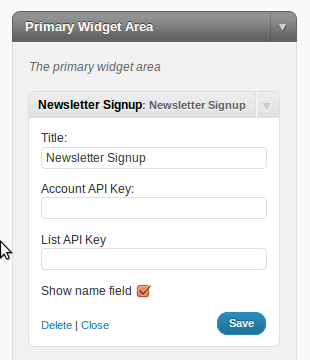
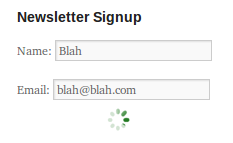
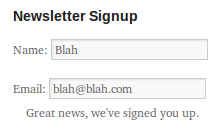
The result is a mini-form in your sidebar, that submits the request via Ajax without the user leaving your site.
Adding a form inline in a post or page
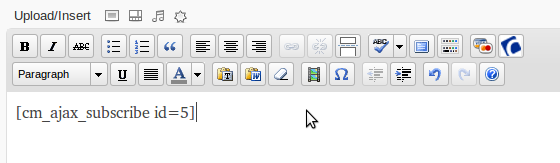
You can also add a form as a shortcode to your posts and pages. Simply click on the “Campaign Monitor” button that appears above the post editor:

You’ll be asked to insert your API key details:
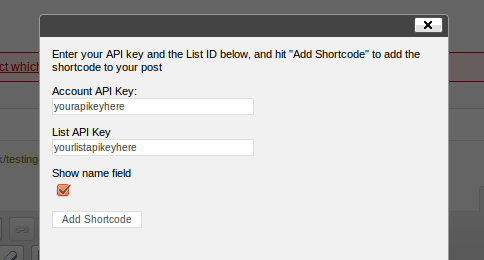
and a shortcode will be placed into your post to display the form:
January 14, 2011 at 12:06 pm
This is really nice. Translation is very important. Here are the two places I would like to see it. In the Greet Box WordPress plugin. Especially with a mobile version of WordPress. And in the pop-up over plugin from WPMUDEV.
Keep up the good work.
February 1, 2011 at 10:12 pm
Thanks, Lee!
Can the plugin be expanded to multiple lists? If so, can it (at the webmaster’s option) display a check-box for each list?
Does the plugin also work for confirmed (double) opt-in lists as well? If so, can the plugin be expanded to automatically detect the list type and display a different confirmation message? (the list type can be changed, so this might be tricky.)
Can the plugin be improved to allow a custom confirmation message?
Can I have a pony?
February 1, 2011 at 11:02 pm
News of the WordPress plugin is very timely for me, because I’m now working to add a newsletter option to my website, which is accessed mostly in Japan, and therefore is bilingual.
I’d like to know if the widget can be set up so that “Country” can be seen in the signup box, along with Name and Email.
February 1, 2011 at 11:58 pm
Hi – the plugin doesn’t currently support custom fields I’m afraid.
February 2, 2011 at 3:02 am
Hi,
I’ve installed this on a website, but using the shortcode acts strangley. It displays fine in Safari, but not in Firefox or IE. It just shows:
[cm_ajax_subscribe id=0]
Do you know any way to fix this?
Thanks,
Tommy
February 2, 2011 at 8:18 am
Hi Tommy,
Shortcodes are converted to HTML by the server, before the page is sent to the browser, so I can’t see any reason why choice of browser would make any difference. If you’ve still not worked this out can you send me:
– A link to a page showing the problem
– Detailed steps of how you’ve configured the plugin and/or a login to your WordPress dashboard.
You can send the info here: http://www.leewillis.co.uk/contact/
Thanks
February 2, 2011 at 11:37 pm
Thanks for the quick reply Lee. I’ve come to a similar conclusion – the exact same setup works fine hosted somewhere else. Looks like GoDaddy is the issue…
February 2, 2011 at 12:12 pm
Would you be able to ‘score’ a Google Analytics goal using this form? That’s one benefit of having the url redirect on submission, that you can use GA to monitor/track how many times a form has been completed by setting the redirect url as a goal.
Tidy work nevertheless!
February 2, 2011 at 12:33 pm
I guess there are two options. The “success” javascript could output the events either to generate a virtual “page visit”, or it could output a GA “event”. Not sure which would be people’s preferred approach – making it work for everyone would be the challenge I guess!
February 4, 2011 at 6:41 pm
Update: IE8, Safari 5.0.3 and Firefox 3.6.8 only display the short code [cm_ajax_subscribe id=1]. Chrome displays the HTML Form.
February 4, 2011 at 6:45 pm
As I replied to Tommy previously, shortcodes are converted to HTML by the server, before the page is sent to the browser, so I can’t see any reason why choice of browser would make any difference. If you’ve still not worked this out can you send me:
– A link to a page showing the problem
– Detailed steps of how you’ve configured the plugin and/or a login to your WordPress dashboard.
You can send the info here: http://www.leewillis.co.uk/contact/
February 4, 2011 at 7:30 pm
Yea, this one is strange because I understand that and can’t see any reason why a choice of browser would make any difference either.
February 4, 2011 at 9:31 pm
Got a link?
February 4, 2011 at 6:46 pm
I’ve had a couple of people report this, but in all cases they were using their “Client ID”, instead of the main “Account ID”. The account ID needs to be the first one listed here:
http://www.campaignmonitor.com/api/getting-started/
February 4, 2011 at 7:27 pm
Right, so it’s the big king kahoona ID. There are three API’s and as I was twiddling thumbs I though of trying that. You confirmed it. Thanks
February 6, 2011 at 6:12 pm
Cool plugin.. haven’t actually installed this yet but I know I will get a lot of use out of this plugin as I add Campaign Monitor sign up forms to nearly every website I do and I hate the Contact Form 7 plugin. Is there a way to add this to my templates with a template tag? I don’t tend to use widgets.
Thanks
February 6, 2011 at 9:41 pm
There isn’t a template tag as such. However – you should be able to achieve what you want as follows:
do_shortcode('[cm_ajax_subscribe id=0]');
February 11, 2011 at 8:19 pm
Great thanks for your help… keep up the good work
February 14, 2011 at 3:20 pm
I’m attempting to do as you describe here, but can’t quite get it to work.
I want to add the shortcode to the footer.php of my template (I don’t really use widgets.)
To make sure I had the shortcode set up correctly, I created a new post and used the visual editor as you describe. (Interestingly, when I entered both API keys and submitted them, I just got a white screen with the number “0”. But when I pasted the shortcode [cm_ajax-subscribe id=0] into the post and tested it, I was able to successfully add to my list. Great!)
Unfortunately, when I add to my footer.php file, nothing shows up.
Am I missing an obvious step here? Anyway, thanks for the plugin. I’m excited to get it working because it’s a HUGE improvement over what I had there.
February 14, 2011 at 6:33 pm
Hi. Firstly I assume you meant:
[cm_ajax_subscribe id=0]
and not
[cm_ajax-subscribe id=0]
Secondly – you can’t just insert the shortcode into your template files as-is – you need to wrap it in a call to do_shortcode() as described here: If you’ve done that and it’s still not working – can you drop me some login details onto the contact form and I’ll see what I can see…
February 14, 2011 at 6:45 pm
Ah – yes. I did mean to use an underscore.
I added the following to my template:
and it didn’t show up.
That said, it could be that my theme (which is one I customized by modifying TwentyTen) is somehow causing the problem. In case it’s not obvious by now, I’m not an expert in this stuff, but trying to learn.
I will send you login details, and I GREATLY appreciate your time. Thanks!
February 14, 2011 at 8:32 pm
For future record, you have to “echo” the output from do_shortcode, ie:
February 10, 2011 at 1:29 pm
Thanks for the great plugin.
I have been tinkering with it to try to make the form disappear when the subscription is successful and only display the success_style. What would be the best way to do this.
Thanks
February 10, 2011 at 10:34 pm
Hi,
You didn’t say whether you’re using a widget – or a shortcode. I’ve assumed widget below – the changes will be similar for a shortcode – just in a different file!
Open up cm-ajax-widget.php and look for these lines (Around line 187):
if (data == 'SUCCESS') {jQuery('form#cm_ajax_form_number; ?> .cm_ajax_success').show();
Add an extra line to hide the form:
jQuery('form#cm_ajax_form_number; ?>').hide();Note: There shouldn’t be a space between ? and php …
February 11, 2011 at 2:29 pm
Thanks for your quick response, i added something to the code you posted so it would still display the successful subscription text.
jQuery(‘form#cm_ajax_form_number; ?> .cm_ajax_success’).show();
jQuery(‘#cm-ajax-name’).hide();
jQuery(‘label’).hide();
jQuery(‘#cm-ajax-email’).hide();
Thanks for pointing me in the right direction.
February 16, 2011 at 9:22 pm
Hiya – can you drop me a note using the Contact form with details of the site that’s failing …
March 28, 2011 at 6:26 pm
Great idea, but I’m getting the following error message: “Sorry, we weren’t able to sign you up. Please check your details, and try again.” I’m on hostgator running PHP 5.2 so I don’t think that’s the problem. Any help would be greatly appreciated… would love to use it.
March 28, 2011 at 9:16 pm
Try this guide I’ve just published:
http://www.leewillis.co.uk/debugging-problems-campaign-monitor-widgets/
Pingback: Debugging Problems with the Campaign Monitor Widgets – Lee Willis’ Blog | leewillis.co.uk
May 12, 2011 at 3:20 am
Hi, just installed your widget and it works great. One question though, is there a way to edit the confirmation message? I am using a single confirmation and getting a few people who aren’t aware there’s an email that needs to be approved before they’re actually subscribed.
May 12, 2011 at 7:47 am
Not currently, without editing the string in cm-ajax-widget.php or cm-ajax-shortcode.php.
I’ll look at making this either filterable, or translatable so that you can make a local configuration without having to change it each time you upgrade.
September 23, 2011 at 9:21 am
Great widget 🙂 I’m just having a problem with presentation of the web page that should be displayed after someone completes the subscribe form. I set up a link to the subscribe confirmation page in CM and with the normal CM subscribe function in a page the subscriber is redirected to the page after subscribing. Using your widget just gives the subscribe confirmation message but no automatic redirect to the confirmation page. Any ideas?
September 23, 2011 at 10:01 am
Hi,
The whole point of this widget is that it doesn’t redirect the user, just submits an AJAX request and handles it all from there. If you want to take users to the confirmation page, you should use the standard CM subscription forms.
September 23, 2011 at 10:15 am
Yup, that makes sense – thanks for the quick reply 🙂 While I have your attention, can I ask on an unrelated issue, if it would be possible to change the submit button title to read something other than Register as it currently does and if so, where/how to do it?
September 23, 2011 at 5:53 pm
It’s in cm-ajax-shortcode.php and/or cm-ajax-widget.php.
September 25, 2011 at 9:11 am
Excellent, all solved, many thanks.
May 12, 2011 at 10:22 am
This is a great widget – but is it possible to have custom fields in the form too? Thanks
May 12, 2011 at 8:14 pm
Not currently no. Creating the UI for adding form fields is quite a big job, so it’s unlikely to make it into this free version. My “WP e-Commerce / Campaign Monitor” plugin includes a filter so that you can add custom fields programatically, e.g. if you always want to add a fixed value, but not sure if that would meet your need?
November 30, 2011 at 2:47 pm
Hi Lee,
Great plugin.
It does not check if the email address is already in the list. Is there an option you will add this in the future?
November 30, 2011 at 8:30 pm
I hadn’t planned on it – there’s no real need since re-adding someone isn’t an “error”, and should fail silently? Is there some other issue it’s causing you?
January 7, 2012 at 4:52 pm
this is the nice plug in ….. can we adjust pop-up massage on success & failed massages ?
January 7, 2012 at 8:48 pm
If you want to change them, then you’ll have to edit them in cm-ajax-widget.php and cm-ajax-shortcode.php. There’s no other way in this version. In the “Pro” version of the plugin the strings are all translatable, so you can translate them with a language file – http://plugins.leewillis.co.uk/store/plugins/wordpress-ajax-campaign-monitor-widgets/
January 9, 2012 at 9:31 am
Would be perfect if it was possible to use it in a pop over plugin like this one http://premium.wpmudev.org/project/the-pop-over-plugin
January 9, 2012 at 7:38 pm
I’ve not used the WPMU plugin so don’t know exactly how it works. However, my plugin can show the form either as a widget, or as a shortcode (and also via template tag-like syntax, by using do_shortcode()).
So there’s quite a lot of ways of generating the form. If none of the above work in the WPMU pop-up plugin then I’d ask them to provide support for either shortcodes, or publishing widgets into the popover, there’s nothing else I can do to make this happen, but seems like it would be sensible if their plugin supported shortcodes and/or widgets in the content.
March 7, 2012 at 12:13 pm
I do not seem to find a CSS and be able to style the plugin?
March 7, 2012 at 8:12 pm
You don’t need a separate CSS file – you can add any styles you want to your theme’s CSS file.
April 20, 2012 at 3:41 pm
Great Plugin. Is there anyway to make the name a required field?
April 20, 2012 at 5:45 pm
It’s not a feature currently offered by the plugin. I’d be happy to add hooks to allow people to provide their own form validation, or it’s probably pretty easy to add Javascript based validation as it stands.
December 10, 2012 at 11:35 pm
Hi Lee
I’m keen to integrate CM into the WPEC checkout experience.
Have you tried this / any thoughts?
December 10, 2012 at 11:48 pm
Yup – done it 🙂
http://plugins.leewillis.co.uk/store/plugins/wp-e-commerce-campaign-monitor/
December 11, 2012 at 7:35 am
I have another dev skinning my plugin (right footer) here:
http://new.domdemarcos.com/
However, how do I either:
A) Change the success / fail messages or
B) Modify the placement of the success / fail messages
Currently the ‘fail’ message is wrapping my content.
December 11, 2012 at 8:36 am
There’s no easy way to change the messages in the free version. In the "pro" version, all of the strings are translatable – so if you’re used to working with standard WordPress language files then you can just create a translation for the string you want to change.
That said – the various outputs all have CSS IDs/Classes so you should be able to easily target them with CSS to change the layout.
December 11, 2012 at 8:56 am
Awesome. Pro version it is!
Great plugin mate.
Cheers.
December 11, 2012 at 9:37 am
Much better! Squared those messages right away.
One small suggestion. Maybe set the FB and Twitter icons a little smaller and have a pre-styled a {
and include a no-repeat scroll .png for the hover? I’m sure most people wind up doing something similar, but it’s sort of weird the plugin adopts the style.css hover style.
At any rate, thanks again. Love the plugin.
March 15, 2013 at 12:27 am
From a cleanly installed plugin,
if (data == ‘SUCCESS’) {
is not evaluating to true even though the request was successful.
There is some extra space or new line sneaking into data. If i use
if (data.indexOf(‘SUCCESS’) != -1) {
it works OK.
Any idead where the extra space could be coming from?
March 15, 2013 at 8:09 am
No idea, could be anywhere in your theme, or one of the plugins you’re running.
July 18, 2013 at 9:49 am
Have the same problem.
Maybe a failsafe jQuery.trim or indexOf can be added to the plugin, to make sure you catch this?
July 24, 2013 at 4:43 pm
I was getting this same issue. The fix for me was to modify to return 1 rather than use SUCCESS. This way I can then use a boolean if(data) in the ajax response.
April 11, 2014 at 10:08 am
Love the plugin. Works great. Unfortunately I’m getting hit hard by spam. Is there any way of adding a captcha or similar?
April 11, 2014 at 10:05 pm
Hi Gareth,
The Pro Version includes Honeypot spam protection which may well help depending on the exact spam you’re being hit with.