The WordPress e-commerce solution from getshopped.org already features a powerful “variations” system that allows you to have different versions of products. This allows you to set colours, sizes or other attributes that make sense for your store. It also allows those choices to affect stock availability, pricing and a whole raft of other variables.
For some store owners this is great, but for others it’s all a bit too complicated – all they need to do is let customers choose from the available options and have those choices recorded against the sale.
Welcome to the “WP e-Commerce Simple Product Options” plugin.
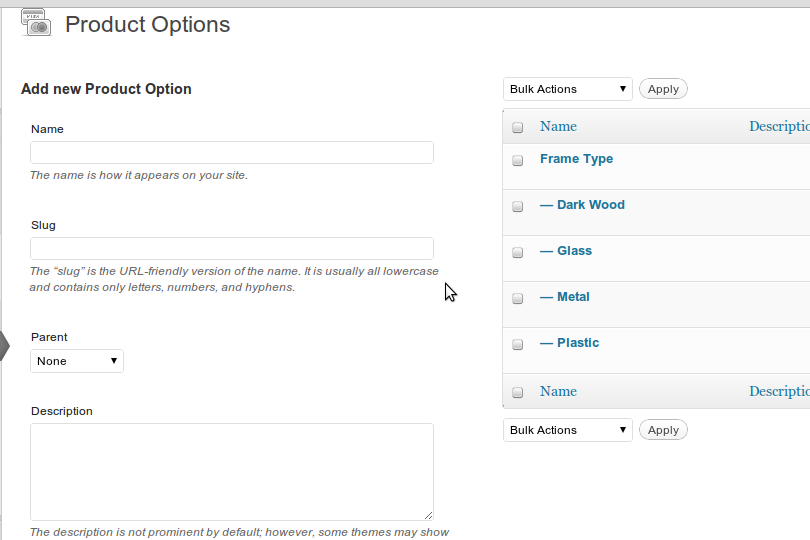
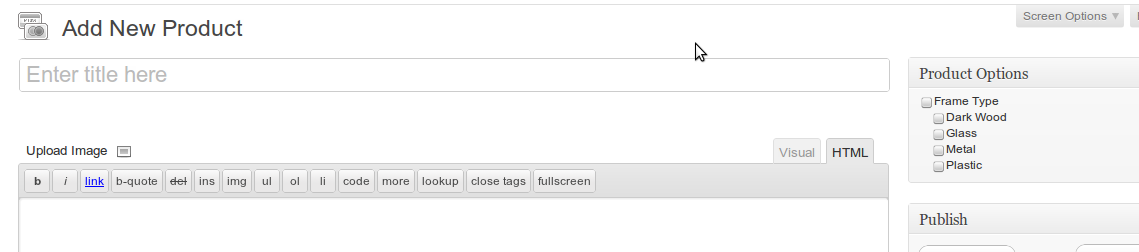
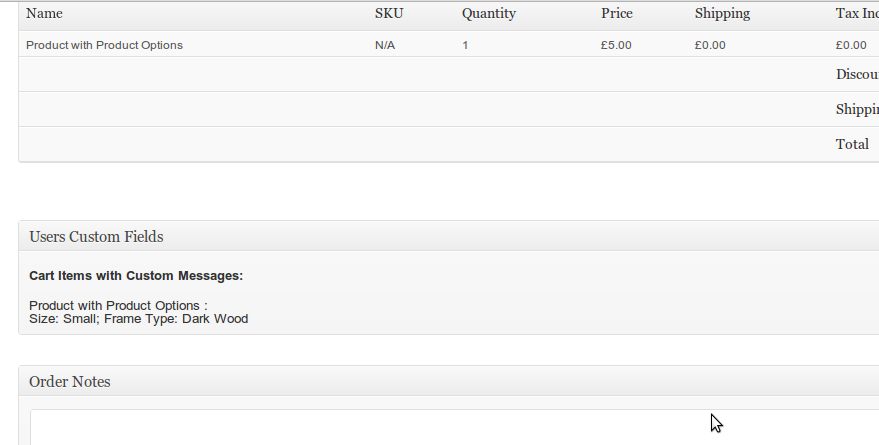
The plugin allows you to set up multiple “option sets” and then options within them. Then for each product you create you can choose which option sets and options customers can choose for it, and then have the customers choices recorded against the product sale.
August 22, 2011 at 3:23 pm
Hi Lee
I got onto your site through jeff Ghazally. We’ve had big issues with variations crashing our site.
Our site sells contact lenses and require lots of variations.
pack sizes – 6 different values
left
right eye
power range – 90 different values
base – 7 different values
diameter
CYL – -0.75/-1.25/-1.75/-2.25
Axis – in icrenments of 10 – from 10 to 180
Add – +1.00, +1.50, +2.00, +2.50, Low, Med, High
Tint – Blue, Sapphire Blue, Green, Hazel, Gray, Violet, brown
We can’t add the last 4 variations because it just freezes the admin and front end. See this page http://optionseyecare.com.au/products-page/bausch-lomb/soflens-daily-disposable-90-pack-90-x-1-day-lenses/
If you need access to the backend let me know.
Will your plugin help solve this problem?
Cheers
Tony
August 22, 2011 at 3:45 pm
It will possibly help – although wouldn’t the choices the user makes for each of those affect the price? (Particularly pack size?).
I guess you could use my plugin for the choices that *don’t* affect price/stock etc, and leave those that do as standard variations…
August 22, 2011 at 4:35 pm
Fortunately all the products are set up individually for each pack size so there is never a need to choose a different pack size.
In fact none of the options affect price except quantity.
Does this make it more workable?
Cheers
Tony
August 22, 2011 at 4:45 pm
Hi Lee
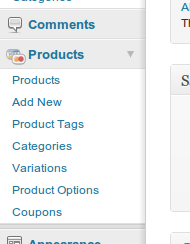
I just uploaded your plugin and activated it but it doesn’t appear in the products menu.
Could you advise what I could be doing wrong please.
Cheers
Tony
August 22, 2011 at 7:29 pm
No idea really Tony, the plugin just registers a standard WordPress taxonomy, and relies on WordPress (pretty much) to show the menu entries. My only thought is that it could be related to permissions – are you running as a blog administrator – or something else?
August 22, 2011 at 4:47 pm
Hi,
Looks like your plugin is exactly what I need for a client. We need options for the customer to choose from but the options themselves don’t affect the price. We tried variations but we noticed that with tiered pricing, each variation essentially becomes it’s own product. This seemed great to begin with but ultimately, if a customer wants say 4 of one variation and 7 of another, they weren’t getting the 11+ price rate, but instead the rate for the respective tier.
I’ve installed your plugin, and I set up the options in the WP Admin interface. I also see how to apply the options on a Product in the Admin interface, but, I am not seeing the options appear for the customer on the Product page itself. Am I doing something wrong? Or is there some code I need to add to the single product template?
I would appreciate any help you can offer and If you’d like to login and take a look I can get you an admin login.
Thanks!
August 22, 2011 at 7:57 pm
I’ve replied to the thread on getshopped.org here:
http://getshopped.org/forums/topic/simple-product-options/#post-221481
August 22, 2011 at 7:59 pm
Thanks Lee. I’m about to try the fix you posted. Hoping this is what I need. And thanks again.
August 22, 2011 at 4:49 pm
Hi Lee
Sorry to send so many emails – does your plugin run on WP MU – could this be the problem why it’s not showing in the products menu?
Cheers
Tony
August 22, 2011 at 7:30 pm
I haven’t tested with MU specifically, but I can’t think of any obvious reason why it wouldn’t work …
August 22, 2011 at 8:07 pm
Hi Lee
Am logged in as super admin. Desperate for this to work. Any other ideas.
Cheers
Tony
August 22, 2011 at 8:25 pm
What happens if you try and visit wp-admin/edit-tags.php?taxonomy=wpec_product_option&post_type=wpsc-product
??
August 22, 2011 at 8:33 pm
Hi Lee
I see Product options with this error message at the top.
You should create “Parent” elements for each option type you want, and then “child” elements for each individual choice for that option. Do not create children of children as they won’t show up
August 22, 2011 at 8:39 pm
That sounds about right … that’s the taxonomy edit screen for the Product Options taxonomy. No idea why the menu item isn’t showing up for you, but you should be able to use that URL to configure the available options.
August 22, 2011 at 9:26 pm
Great thanks Lee.
I created 2 product options with their children(values) but how do I access these.
I went to edit an existing product and tried creating a new product but could not see the options.
Do you think it’s related to not showing in the product menu?
Cheers
Tony
August 23, 2011 at 10:17 pm
Almost certainly. For some reason it appears you don’t have access to that taxonomy for some reason …
September 4, 2011 at 3:41 pm
Hi Lee, sounds great. Would this work for downloadable goods? I an album (music) comes in variations of 128bit MP3, 320bit MP3 and FLAC files. The customer can choose which format they want to purchase and will receive the correct download file after successful transaction?
September 4, 2011 at 9:01 pm
I’m afraid not. This plugin only works where the “options” don’t drive different behaviours (Price, stock levels, downloadable file, etc.).
I can’t see why you wouldn’t be able to do what you described with the standard WP e-Commerce variations though.
September 4, 2011 at 9:44 pm
Sadly not as far as I tried. I wasn’t able to offer different download files for the variations.
Never mind – worth a try.
September 4, 2011 at 9:46 pm
Pretty sure you can – you just click into each variation, and set the download file you want for that variation?
September 5, 2011 at 9:26 pm
This is pretty much what I need with one exception. I don’t have any price difference on each variation, but I still want to track how much of each variation is in stock. Is there any easy add-on for this?
September 5, 2011 at 9:58 pm
You’d have to use WP e-Commerce’s built in “variation” functionality for that.
September 12, 2011 at 11:33 pm
Hey Lee,
Not sure if anyone else has come across this error but when I have this plugin activated and one of my products does not use it ( uses the normal variations ) it was coming back with an error on the page. I went ahead and added an if statement inside the display_product_options function and now it runs like a breeze.
Here is the replacement function if anyone ends up needing it, although I’m sure you will just end up putting this in your next update.
http://www.text-upload.com/read.php?id=137464&c=7141753
Thanks Lee
September 13, 2011 at 7:43 am
Think this is fixed (In a slightly more warning-proof way) in the dev version, see my note here:
http://getshopped.org/forums/topic/simple-product-options/page/2/#post-224535
September 13, 2011 at 3:58 pm
Ahh, I see. I should have looked a little further.
Code looks much nicer than my boring if statement. 🙂
September 14, 2011 at 3:22 am
Hi Lee, I really like your plugin, as it helped in allowing me to add the necessary options to my shop.
At first, my options weren’t showing up, but thanks to your directions, I have modified wpsc-products_page and single_page to make them show up.
My problem is the display of the options. In Firefox(Mac) the options are staggered, I believe it’s because it doesn’t see a line break. In Safari, it works fine though. I have not checked any PC browsers.
The second problem, is that the options are showing up backwards like this:
|Small| Size:
|Blue| Color:
I need it to show up like this:
Size: |Small|
Color: |Blue|
Any ideas?
September 14, 2011 at 7:23 am
You’ll see the same thing in other browsers (Specifically, I see it in Chrome and Firefox on Linux. The cause is your theme’s stylesheet which is adding “float: left;” to your select boxes. The labels and select boxes have specific CSS classes (wpec-product-option-title and wpec-product-option-select respectively) so you should be able to add CSS rules to amend this for the product option stuff if you still need that style on the rest of your site.
September 21, 2011 at 6:33 am
Nice work Lee, that was exactly the problem. Any idea why the options do not show in the shopping cart. In other words, once the user has made his selections on the options, that are necessary to process an order, they are not visible. http://aniceday.org/products-page/
Thanks again for your help.
chris
September 21, 2011 at 7:27 am
Hi,
WP e-Commerce doesn’t show the personalisation information during checkout I’m afraid. You’d need to modify your checkout theme page (wpsc-shopping_cart_page.php) to achieve that.
November 3, 2011 at 10:00 pm
Could you point me in the right direction for accomplishing this?
1. How would I retrieve the option name?
2. Are you planning on including this in a future release or is this even possible?
BTW your plugin is amazing. Exactly what I have been looking for.
November 3, 2011 at 11:14 pm
I’ve recently committed some hooks to WP e-Commerce to allow this to work. So – if you have the latest version of MY plugin then all you need to do is port over the changes here:
http://code.google.com/p/wp-e-commerce/source/diff?spec=svn1075&r=818&format=side&path=/trunk/wpsc-theme/wpsc-shopping_cart_page.php
http://code.google.com/p/wp-e-commerce/source/diff?spec=svn1075&r=983&format=side&path=/trunk/wpsc-theme/wpsc-shopping_cart_page.php
and you’ll be good to go!
November 3, 2011 at 11:26 pm
Awesome that looks great! It works perfectly. Thank you very much. In theory could I also do this with the shopping cart?
thanks for you hard work on this plugin.
November 3, 2011 at 11:29 pm
You mean the cart widget?
http://code.google.com/p/wp-e-commerce/source/diff?spec=svn983&r=983&format=side&path=/trunk/wpsc-theme/wpsc-cart_widget.php
November 3, 2011 at 11:33 pm
Yeap, that was it! so… where is the donate button? 🙂 Seriously.
November 3, 2011 at 11:34 pm
It’s here 🙂
http://www.leewillis.co.uk/wordpress-plugins/
November 3, 2011 at 11:38 pm
There ya go! Have a beer or something on me. Thank you again for your help and the plugin.
November 3, 2011 at 11:40 pm
Cheers – much appreciated!
November 4, 2011 at 4:47 pm
…Me again… 🙂
When using your plugin with a customized field I get one long string.
http://ScrnSht.com/ehpifg
Notice how
My Spectacular Event Select Size: S
all runs together.
Is there a way to make your option break to a new line?
thanks!
November 4, 2011 at 6:55 pm
I’m assuming that “My Spectacular Event” is the personalisable text, and “Select Size” is the start of your options?
Try editing simple-product-options-frontend.php, look for line 54, it should read:
esc_html_e ( $option );Change it to
echo nl2br ( esc_html ( $option ) );If that works I’ll stick it in the next release.
November 4, 2011 at 8:27 pm
Perfect. Thanks!
October 6, 2011 at 12:17 pm
hi,
i am trying to setup a site for a client, and they need 2 prices per product. is this possible with your plugin?
October 6, 2011 at 6:19 pm
No – this plugin doesn’t allow you to set different prices for the options. It sounds like what you want is the standard “Variations” capability. I’d head on over to http://getshopped.org/forums/ and ask around there if you’re not sure how to set variations up.
October 7, 2011 at 4:22 pm
Still no options added to product’s admin page show for me on the live product page.
Using latest plugin version. Tried on both wpec latest, and previous version, and added the line of code you suggested.
Using default 2011 theme with nothing but wpec running.
Added line to theme file and plugin version of the file.
Still nothing.
October 13, 2011 at 2:20 pm
Hello Lee,
The plugin has stopped working with the new WP Ecommerce update.
Any feedback?
October 13, 2011 at 2:43 pm
Can you define “stopped working” ?
October 14, 2011 at 7:18 am
Hello Lee
After we have added product options, is there any way to set the order of those options from backend itself?
October 14, 2011 at 7:26 am
Not really I’m afraid … I believe the options are sorted by name – so it’s possible you could name them in such a way that they’d display in the order you want.
October 14, 2011 at 8:11 am
okay.. so is there any extension of this plugin through which we can set a sorting order for the product options as required?
November 23, 2011 at 1:36 pm
I installed this plugin, all looks/works fine in WP admin but the options box just does not show up on the product page… its enabled for this product
http://41orchard.com/new/shop/personalised-wall-decals/apple-initial/
as you can see there are no options showing up, any ideas why not?
November 23, 2011 at 2:55 pm
It’s possible that your theme files don’t include the required hooks. See the note here:
http://wordpress.org/extend/plugins/wp-e-commerce-simple-product-options/installation/
[Point 5 – Which applies to anyone using non-standard WP e-Commerce theme files [Your case], or theme files from a release below 3.8.6]
December 10, 2011 at 4:28 pm
Testing your plug in for a client.
Many thanks for creating it.
Is there a simple way to remove the options from the Gold Grid Display in a Category view? (Just want them to show up on the Product view)
December 10, 2011 at 10:04 pm
The simple way would be to remove the hooks from the Gold Cart category template file. It’ll be do_action(“wpsc_product_form_fields_begin”); or do_action(“wpsc_product_form_fields”);
January 22, 2012 at 10:32 am
Hi Lee.
This is amazing plugin.
One thing I really want is ordering fix.
For example, variation which can choose “month”
It should be order by 1,2,3,4,5,6,7,8,9,10,11,12.
However it start from 10,11,12,1,2………
Is there any way to fix this probrem?
there’s solution for WP e-Commerce’s built in “variation” function.
http://www.getseenonline.com.au/wp-ecommerce-variation-ordering-fix.html
But I would really love to use your plugin instead of built in one.
Thank you.
January 22, 2012 at 11:20 am
As per the previous comment, the current version of the plugin sorts by name, and I don’t have any plans to change that specifically. The original plugin was developed for a client and they’re happy with the current functionality.
I’m happy to look at porting similar functionality into the plugin as a paid commission. If you’re interested, get in touch here and I’ll put a quote together for you:
http://www.leewillis.co.uk/contact/
January 31, 2012 at 6:41 am
I’m beginning to see this plugin is not what I was looking for. I was hoping to add a product option which is a text field you type in a url, but only for admins adding the product. not an option for a customer.
February 8, 2012 at 12:43 am
Hi Lee, gorgeous plugin, congrats,
I need to know if it´s possible(maybe with a nothing fancy proceed) to send the product options info to the transaction results and emails for customer and admin.
At this time I have the product option selected info in the wigdet shopping cart and checkout, but still need transaction results and emails.
I try with something like this without any success: http://getshopped.org/forums/topic/custom-fields-for-admincustomer-email/
Any help is really welcome.
Thank you very much in advance
R
February 8, 2012 at 8:28 am
Product options are per-item, not per order so you’d need to hook onto the filter wpsc_transaction_result_content, and generate the output there. The filter gets passed an array containing the purchase ID (Order number), the cart item record, and the whole order object.
The product options are stored in the custom_message field on the cart item record I believe.
Patches welcome 🙂 [Or I’m happy to quote for developing this if you’re interested – just drop me a note on the contact page]
March 6, 2012 at 3:36 am
Hello Lee,
I dropped you a message through your contact form, but wasn’t sure which would be the quicker way to contact you.
I’m attempting to use this wonderful plugin… Unfortunately, even after searching all the solutions on this comment thread and the GetShopped message board, I’m still unable to find a solution.
Here is the page I have currently set up:
http://www.madmallninja.com/products-page/slings/test-product/
The page will show variations, but not options. In the message I sent you, I included an admin login.
Let me know if you can help.
WP e-Commerce: Version 3.8.7.6.2
Simple Product Options: Version 1.4
Thank you!
Sam
March 6, 2012 at 4:41 am
As a note, I figured out that it had something to do with my “wpsc-single_product.php” file. The one that came with my template was a bit funky. When I’d copy over the one from WP e-Commerce, everything would show up, but the CSS would be messed up.
Long story short, without really knowing what I was doing, I copied everything from <form class="product form" to in the WP e-Commerce “wpsc-single_product.php” file and pasted it over that same range in my template’s “wpsc-single_product.php” file. It’s left most everything on the page intact and is now showing the options.
It looks like I have to massage it a bit more to get it looking correct… However, my issue at large seems to be mostly solved. I’m going to bring this up on the forum for my theme, but any additional advice you can provide would be very welcome.
Thanks!
March 29, 2012 at 1:48 pm
Thanks a million for this. Excellent plugin that removes the need to pass on all that meaningless data (if you’re not setting any of it). Instantly reduced load and upload times.
April 22, 2012 at 4:20 am
Thank you very much Lee, this plugin is a lifesaver!
I had hundreds of products that each had 3 – 4 variations but the same price across all, and it was an absolute nightmare trying to get all the pricing working.
After installing your plugin and spending 5 minutes tweaking it all worked perfectly. Certainly saved me a very long week!
Cheers
April 23, 2012 at 4:56 pm
Hi Lee
Can you help me with this I want to sell beds on my e commerce site however when it comes to checkout it will be :
a – Choose size of bed
b – Choose construction
c – Choose drawer option
d – Choose fabric
And the answer to a will determine what appears in b and the answer to b determines what appears in c as the options prior to check out. For example a single bed with a divan construction has no drawers, yet a double one can with divan base can have 2 or 4 drawers ?
Does your system cater for this ?
Cheers
June 1, 2012 at 5:54 am
Hi Lee,
is there any way this could be extended to have an option to choose how many of a variation the user wants. A textfield or a numeric + – selector.
Say for example candles, choose 6 for your set from these 4 scents
lemon – number entry field by each scent
tea
mango
grass
June 3, 2012 at 9:02 am
That’s a standard WP e-Commerce option:
Settings > Store > Presentation > Add quantity field to each product description
June 6, 2012 at 8:21 pm
I was not clear, what I was thinking was that each option would let you choose a number of that option to add to the product.
On another topic though. Do you have any tips on what hooks might be missing from my theme. http://gasolicious.com/craft_test/products-page/blues/blue1/
The product options do not appear. I have confirmed they are working in Twenty Eleven. I would love to fix this in the theme.
June 7, 2012 at 8:24 am
To do what you’re after regarding buying specific quantities of different options would require customisations I’m afraid if you want users to be able to do it all in one go – it’s not something straight forward.
Regarding the options not showing, this page gives info on what changes are required:
http://wordpress.org/extend/plugins/wp-e-commerce-simple-product-options/installation/
June 7, 2012 at 3:19 pm
Thanks for the replies Lee. I have a suggestion/feature request for some future version if it is possible.
Imagine this scenario, the product is a basket of candles. The user chooses 6 candles. There is a choice of 40 scents. To add 6 Product Options selectors you need to make 6 separate Option groups of the scents which are all identical.
Would it be possible to have a setting where you could say I want to add 6 selectors for this particular Option group to the product. I can see this being very useful.
June 12, 2012 at 2:13 pm
Hi Lee,
Great plugin…got it working ok.
Don’t know if anyone else has asked this or if you have posted any info on this but is it possible to get and show the parent options ‘description’ on the single product page?
Thanks in advance 🙂
June 12, 2012 at 8:09 pm
No-one’s asked 🙂
There’s no way to do it without modifying the plugin currently – there aren’t any hooks or anything to attach to. If you’re up for a bit of a coding, I’d happily add hooks that you need so you could extend it yourself – just let me know what you need. If you’re not really into coding – I’ll happily give you a quote – just drop me a note on the contact page .
July 4, 2012 at 7:36 am
Probably because your WP e-Commerce theme files have been customised, and don’t contain the hooks needed to add this information. Check that your wpsc-shopping_cart_page.php file contains the following lines:
<?php do_action ( "wpsc_after_checkout_cart_item_name" ); ?>July 5, 2012 at 7:32 pm
It doesn’t have it, but when I open the core plugin that I downloaded it doesn’t have it either. If it is supposed to be there then can you tell where.
Thanks again.
July 5, 2012 at 7:45 pm
I’ll update the version number, but see point 5 of the installation instructions 🙂
http://wordpress.org/extend/plugins/wp-e-commerce-simple-product-options/installation/
July 5, 2012 at 7:52 pm
Thanks. I had read that posting so I already tried added that line, but no change. I also already had this line in
I don’t know if that makes a difference or not, but it was there before I added
Thanks
July 6, 2012 at 3:57 am
Well I got half of it to work. I needed to upgrade the WP Commerce to 3.8.8.3. I can see the options selected during checkout, but when you get transactions results it doesn’t show up and when you get the email you don’t see the options either.
I feel like I’m close if you could help a little more.
Thanks.
July 8, 2012 at 3:15 pm
Thanks again for your help. Is there anyway to do what I mentioned in my last comment … have the options show up on the transactions results and in the 2 emails that are sent out?
Thanks.
Mark
July 8, 2012 at 4:47 pm
I’m sure it could be done, but it’s not something offered by the plugin as it stands. If you’re interested in a quote for adding this feel free to drop me a note on the Contact page.
July 6, 2012 at 7:18 am
I am starting to learn wordpress with wp e-commerce plugin. I found your plugin very useful and easy to use. Though one thing that I need to do is to add a product option say ‘Name’ and will display an input field beside it that lets user enter their desired value. Is this doable right now? Thank you very much.
July 18, 2012 at 9:32 pm
Hi, would this add-on/plugin allow the products to have more than one sku per product? Within my company we have products that are listed in our inventory with several/multiple sku’s for each variation of each product. Is this possible?
July 19, 2012 at 7:24 am
No – you’d need to use WP e-Commerce’s variations feature if you want to store data like SKUs against each option.
August 14, 2012 at 2:24 am
Hi Lee-
Brilliant plugin, we have been using for awhile and love it!
A hopefully quick question. I would like to re-order how the text options display so that our more used options show more toward the top on the list, instead of the least used, which is currently what is at the top. Here is a sample product: http://www.newworldketubah.com/ketubah-products-page/ketubah-by-rachel-deitsch/op-fields-ketubah/
Any way to force this?
thanks!
-D
August 14, 2012 at 3:28 pm
It’s covered in the FAQ:
http://wordpress.org/extend/plugins/wp-e-commerce-simple-product-options/faq/
August 19, 2012 at 6:05 pm
Hi Lee,
I love this plug in but suddenly all the options are showing up twice. Any suggestions?
Thanks in advance!
August 20, 2012 at 9:43 pm
Sounds like the hooks are being called twice by your theme.
August 20, 2012 at 10:05 pm
Thanks for your response. How can I fix that?
August 20, 2012 at 10:06 pm
I appreciate you help.
September 2, 2012 at 9:07 pm
Hi Lee, great improvements for the plugin, now the production option shows at checkout and at dashboard. Cool
If i would like to add the prodcut option to the “reciept” (product_list), where would i start to look.
When modding “wpsc-transaction_results_functions.php”, can i somehow pull the simple product option from somewhere, so the customer can be reassured he picked the right options.
Thanks alot!
September 3, 2012 at 9:28 pm
It’s in the $cart array, in the custom_message field.
November 22, 2012 at 12:17 pm
Hi lee
I have a site i wanted to use your plugin on and it had more than one option list on it and i would like it so the user had to select from the first list before the second is usable/visible or clickable is this possible?
Thanks
Joe
November 22, 2012 at 9:00 pm
That’s not functionality my plugin offers.
November 26, 2012 at 11:03 pm
Hi Lee,
This is a great plugin. I have my “figures” set up as product options. I keep reading that the plug in should be sorting them by name but mine are all over the place. Can you tell me why it doesn’t appear to be sorting them correctly. They are in alphabetical order in my backend it is just on the frontend that things are messed up.
http://www.olsonsilver.com/products-page/product-category/103m/
November 27, 2012 at 8:32 am
If you want to control the order, see the FAQ – last question:
http://wordpress.org/extend/plugins/wp-e-commerce-simple-product-options/faq/
November 28, 2012 at 7:43 pm
Thanx Lee. I have one more question. Previously I had your plug in WP e-Commerce Show Personalisation running so that the text my customers input would show up on the checkout page. Everything was working and then I downloaded this plug-in and now the product options show up twice which I understand is because both plug-ins are telling it to but the custom text from my customers no longer shows up. Can you tell me how to fix this?
November 28, 2012 at 7:50 pm
OK I figured out why the custom text was not showing up. How do I remove the part of the code that adds the product option to the cart since I don’t need that showing up twice?
November 28, 2012 at 7:52 pm
bah! nevermind I figured that out too 🙂
May 3, 2013 at 3:48 pm
Hi Lee,
I found that if you have options for a product (for example Black and White colours) and then you need to remove these options as you need to use product variations instead as they have stock management and price control per variation, you can’t remove options dropdown from front end once you ever assigned any options to this product.
What happens is, if you untick all options, after updating the product they will be ticked again. You can narrow it down to one option, but can’t remove them completely without deleted product altogether.
It seems like this plugin don’t save information because it doesn’t treat unticking all boxes as a change.
Best Regards,
Max
I checked this on multiple versions of wp-ecommerce (upgraded up and checking)
May 3, 2013 at 8:30 pm
Can you try the ZIP here and confirm that fixes it for you:
http://downloads.wordpress.org/plugin/wp-e-commerce-simple-product-options.zip
May 4, 2013 at 8:37 am
Hi Lee,
That solved the problem, thank you.
Sorry I thought I already use latest version of simple options (february) and wp-ecommerce.
Thank you,
Max
May 5, 2013 at 10:23 am
You were – the link I posted is to the development branch. I just pushed out a versioned update that includes this fix (1.7)
May 10, 2013 at 12:56 pm
Lee, I stumbled across your plugin this morning and so far it looks like what I need to be able to finish my WP e_commerce store for a client. I tried using Variations and it would not work because it would only allow for 3 of the main Variations to show up.
What I need to do is set up 25 Variations that have 31 different entries in each of the 25 Variations. ALL 25 have the same 31 different entries. So far I have tested yours by entering 5 and adding 3 each and they show up on the order.
Here is my issue:
One, is there a way to import from Variations over to your plugin so I dont have to redo ALL these entries again
Number 2. When I enter a Variation and then the sub to the variation, I need to be able to enter in a sub to the sub. see the example below.
Scent 1>Baby Powder>(Needs to have option to choose Lite Pink or Baby Blue here)
What is happening is that it just shows up to the Baby Powder and that is all.
Again, thanks for a great fix to my issue.
May 11, 2013 at 7:22 pm
Hi,
The options are just stored as WordPress taxonomy terms, so any solution that allows you to bulk import those should do the job. I’ve not come across one myself, but pretty sure there’ll be one somewhere – seems like a fairly standard requirement.
Regarding your second point – the plugin doesn’t support hierarchical options as you described.
May 15, 2013 at 4:05 am
Hi Lee,
First, thanks for the plugin, very handy and I plan to donate.
My question and/or problem statement: I am doing a site where a user will need to input values for 5 options on the single product page before adding to cart (think tailored dress shirt: neck, chest, length, etc.) but the ranges are so big that drop-downs don’t really make sense. So I need input fields where the customer types a value.
Your plugin is built around drop-downs. Any easy way to change the input to simple text fields? If no, any recommendations on other plugins/solutions?
Much thanks for any input.
Cheers, Davin
May 15, 2013 at 7:22 am
Hi,
The plugin’s whole point is to allow you to select from pre-selected options. If you want the user to enter text you’re better off looking at this: http://www.derekweathersbee.com/products/wpec-personalize
August 4, 2013 at 11:18 pm
Is there any chance of combining the options? I sell sports apparel and custom names/numbers are a must – could there be a plug-in the accepts a data type with each option? IE a drop-down for simple choices but text/numeric fields as well?
August 5, 2013 at 11:25 am
As per the previous reply – the point of this plugin is to allow you to select from pre-selected options. If you want the user to enter text you’re better off looking at this: http://www.derekweathersbee.com/products/wpec-personalize
May 2, 2014 at 9:43 pm
Hello, is there anyway to show the variation price in radio buttons instead dropdown?
Thank you!
May 3, 2014 at 12:42 pm
Hi,
That’s not something that the plugin supports out of the box, you’d need to customise it to do that – check out the code in simple-product-options-frontend.php around line 192.
May 7, 2014 at 1:57 pm
Ok thanks a lot!
May 7, 2014 at 5:45 am
Hello Lee
Quick question
If I had a pizza website
Pizza base price $18.00
Flat rate shipping $5.00
Toppings
Mushrooms .50
Bacon 1.00
Steak 4.00
+13 other toppings
Can the WP e-Commerce Simple Product Options plugin accommodate this?
And how?
I don’t sell pizzas but the example is better 🙂
Thanks Derek
Derek
May 7, 2014 at 7:22 am
Hi Derek,
This is covered in the FAQ (http://wordpress.org/plugins/wp-e-commerce-simple-product-options/faq/). Short answer: No.